Reverse-Engineering a Car's CAN Bus with Claude
Letting an AI agent drive the hunt for an unknown CAN signal — over an MCP server, with the analysis done by real tools and the reasoning done by Claude.
Open the trace of a car you don’t have a database for and you get a wall of hex: a few dozen identifiers, each a periodic burst of eight bytes, none of them labelled. Somewhere in there is the vehicle speed, the steering angle, the door switches — but which identifier, which bits, which byte order, and what scale?
The usual answer is patient manual work: stare at the bits, toggle things, plot bytes over time, guess a scale. It’s a great way to spend an afternoon. This time I wanted to see how much of it I could hand to Claude — not by pasting hex into a chat window, but by giving it tools and letting it drive.
CANExplorer (my CAN/LIN analysis tool) ships an MCP server, so an AI agent can inspect a bus — and reverse-engineer it — through a small, safe set of tools. The analysis engine does the heavy lifting; Claude orchestrates it and, crucially, reasons about what the numbers mean.
I’m not going to dump a real vehicle’s traffic into a blog post. The run below is against CANExplorer’s built-in simulation of an unknown vehicle — but every tool call and every result you see is genuine output from the tools, not something I typed up to look good.
The bus, before
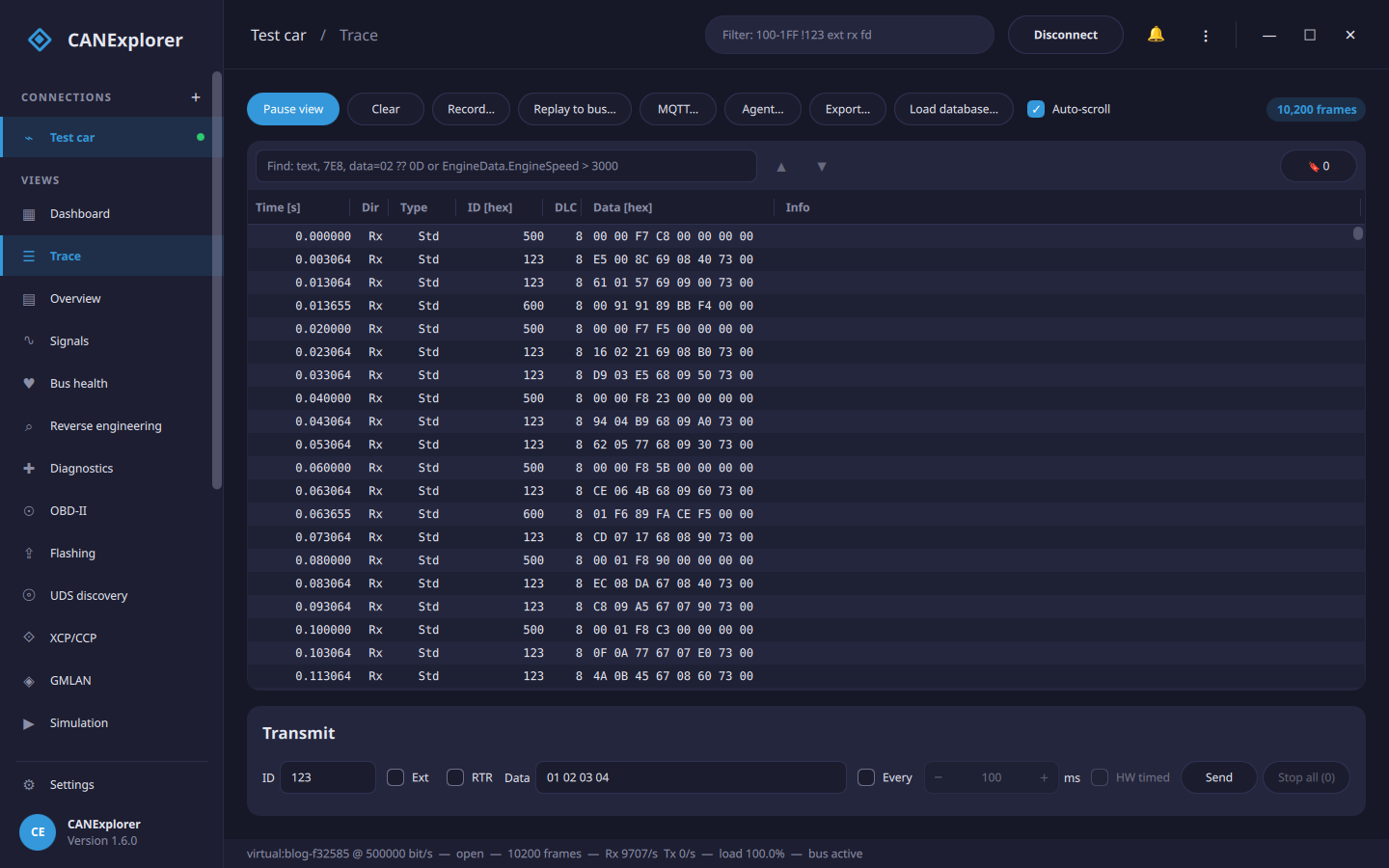
Here’s the trace: three identifiers (0x123, 0x500, 0x600), steady periodic traffic, no database loaded. To CANExplorer — and to us — it’s just bytes.
Handing Claude the keys (read-only)
On the Trace toolbar there’s an Agent… button. It starts an MCP server bound to 127.0.0.1, gated by a one-time token, exposing this live connection — the same bus I’m looking at. I left it on the default read-only tier: the agent can inspect, decode and reverse-engineer, but it cannot transmit anything.
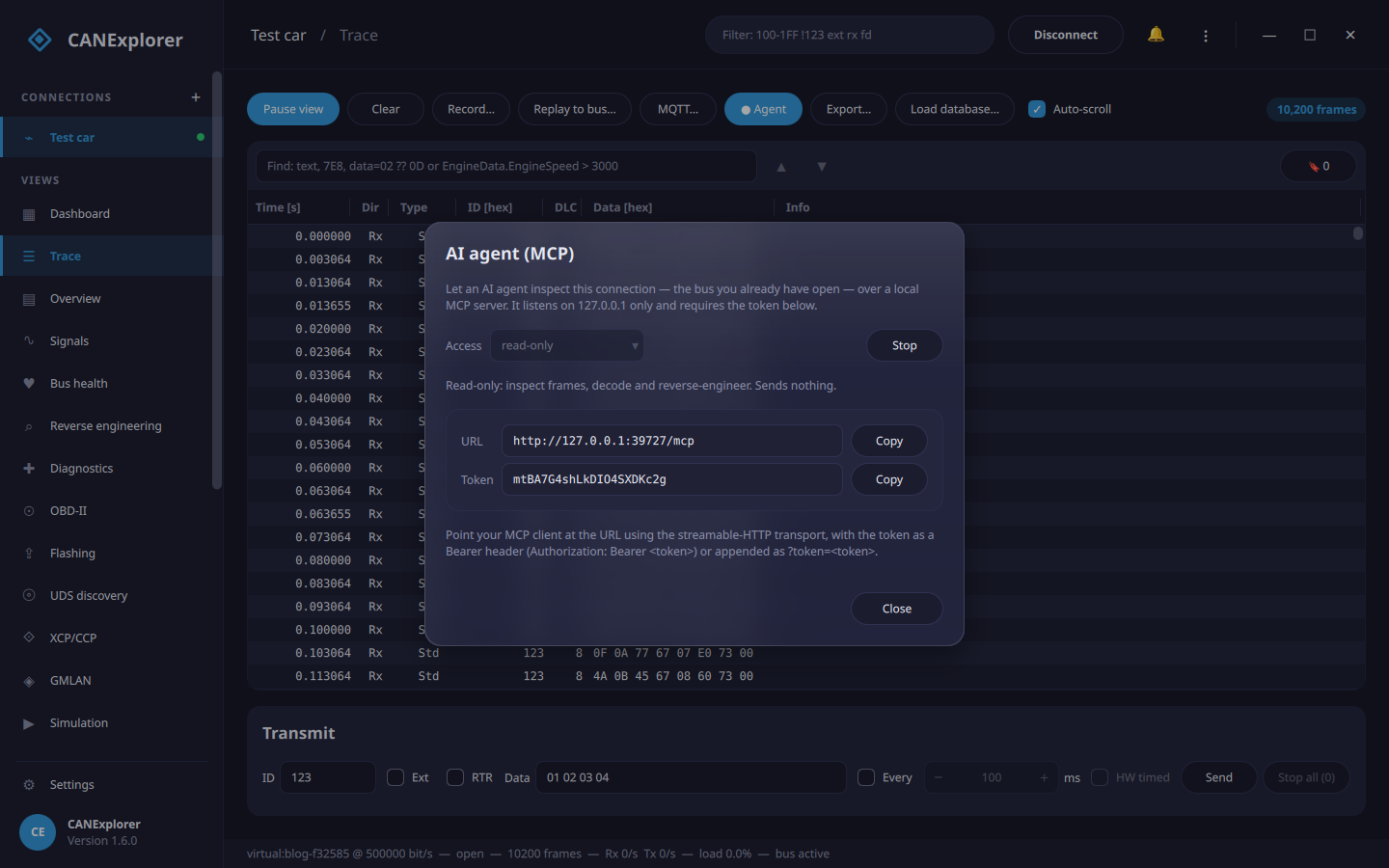
Then I register that URL and token with Claude Code (running locally — a cloud chat can’t reach your machine’s 127.0.0.1):
1
2
claude mcp add --transport http canexplorer-live http://127.0.0.1:PORT/mcp \
  --header "Authorization: Bearer YOUR_TOKEN"
Work on a vehicle or bench you are authorized to inspect. Keep MCP access read-only — it blocks agent-initiated bus traffic — and do any experiment that involves motion with a separate operator in a controlled setting, analysing the capture afterward.
And I tell Claude:
“You’re connected to an unknown car’s CAN bus over MCP. Find the vehicle speed signal. I have a GPS speed log from the same drive at
gps_speed.csvif you need to confirm it. Don’t transmit anything.”
What follows is the actual session — Claude’s tool calls, and the real results that came back.
The hunt
Claude: Let me see what’s on the bus and how it’s timed.
1
2
3
4
→ list_identifiers()
  123  periodic  10 ms  6000 frames  last: E9 CF 28 57 01 60 59 01
  500  periodic  20 ms  3000 frames  last: 2E E0 E4 4E 06 00 00 00
  600  periodic  50 ms  1200 frames  last: 02 69 56 EB 52 EE 00 00
Claude: Three periodic messages. Vehicle speed is almost always a steady, periodic signal, and a 20 ms (50 Hz) message is a very typical rate for chassis/body data. 0x600 looks multiplexed (the first byte cycles, the rest change in blocks) — probably battery cells. Let me run the automatic field analysis on 0x500.
1
2
3
4
→ analyze_identifier("500")
  500[5|14@0+]   physical   conf 0.99   "changes smoothly, 0…12000"
  500[23|16@0-]  physical   conf 0.99   "changes smoothly, -13116…13111 (signed)"
  500[33|2@1+]   enum       conf 0.50   "3 values, rarely changing"
Claude: Two smooth analogue-looking fields and a small enum. The signed one that swings symmetrically about zero (-13116…13111) smells like steering angle. The other — a big-endian value that moves smoothly from 0 to 12000 — is a strong candidate for speed: if it’s scaled by 0.01 that’s 0–120 km/h, a perfectly ordinary range. The analyser gave it 14 bits; let me look at the raw bits to understand why.
1
2
3
4
5
→ bit_activity("500")
  bit 6   constant 0        bit 7   constant 0
  bit 5   flips 0.001       bit 4   flips 0.002       bit 3  flips 0.005
  bit 2   flips 0.011       bit 1   flips 0.023       bit 0  flips 0.046
  bit 8   flips 0.51        bit 9   flips 0.55   ...   (byte 1 flips fast)
Claude: That explains it. Bits 6–7 never change in this capture, so the analyser trimmed the field to 14 bits — but that’s just because we never went fast enough to light up the top two bits. The low byte (bits 8–15) flips quickly and the high byte slowly: a classic big-endian 16-bit value in bytes 0–1. I’ll treat it as the full 16-bit field 500[7|16] — speed can exceed 120 km/h even if it didn’t here. Now, is it actually speed? Let me pull the value out over time and check it against your GPS log.
1
2
3
→ extract_field("500", start=7, length=16, byte_order="big_endian", scale=0.01)
  frames 3000   min 0.0   max 120.0   changes 2949
  series:  0.0 → 30.0 → 90.0 → 120.0 → 90.0 → 30.0 → 0.0 → 30.0 → 90.0 → 120.0  (km/h, over 60 s)
Claude: 0 to 120 and back, twice — that’s a test drive. Let me correlate every field on the bus against your GPS speed to be sure I haven’t found a coincidence.
1
2
3
4
5
→ correlate(csv_path="gps_speed.csv")
  500[7|16@0+]   correlation 1.00   scale 0.009999   offset 0.006   lag 50 ms
  500[5|14@0+]   correlation 1.00   scale 0.009999   offset 0.006   lag 50 ms
  500[0|8@1+]    correlation 1.00   scale 2.56        offset 1.2     lag 50 ms
  500[23|16@0-]  correlation -0.78  (steering — only loosely related)
Claude: That’s conclusive. 500[7|16] tracks the GPS speed with correlation 1.00, and the fitted factor is 0.009999 ≈ 0.01 km/h per count, with essentially zero offset and a 50 ms lag (one message period — the GPS and the bus just aren’t perfectly phase-aligned). The 14-bit and even the high-byte-only views correlate too, which makes sense — they’re slices of the same number. I’m confident:
0x500, bits 7–16, big-endian, unsigned, ×0.01, km/h → VehicleSpeed.
Shall I write it to a database so CANExplorer decodes it live?
Me: Yes.
1
2
3
4
→ promote_to_dbc("vehicle_found.dbc", fields=[
    { identifier: "500", start: 7, length: 16, byte_order: "big_endian",
      scale: 0.01, name: "VehicleSpeed", unit: "km/h" } ])
  { signals: 1, messages: 1, skipped: 0 }
1
2
BO_ 1280 Message_500: 2 Vector__XXX
 SG_ VehicleSpeed : 7|16@0+ (0.01,0) [0|0] "km/h" Vector__XXX
The message comes out 2 bytes because that’s all this one signal needs — grow it to 8 and add the steering and switches later as you identify them.
The payoff
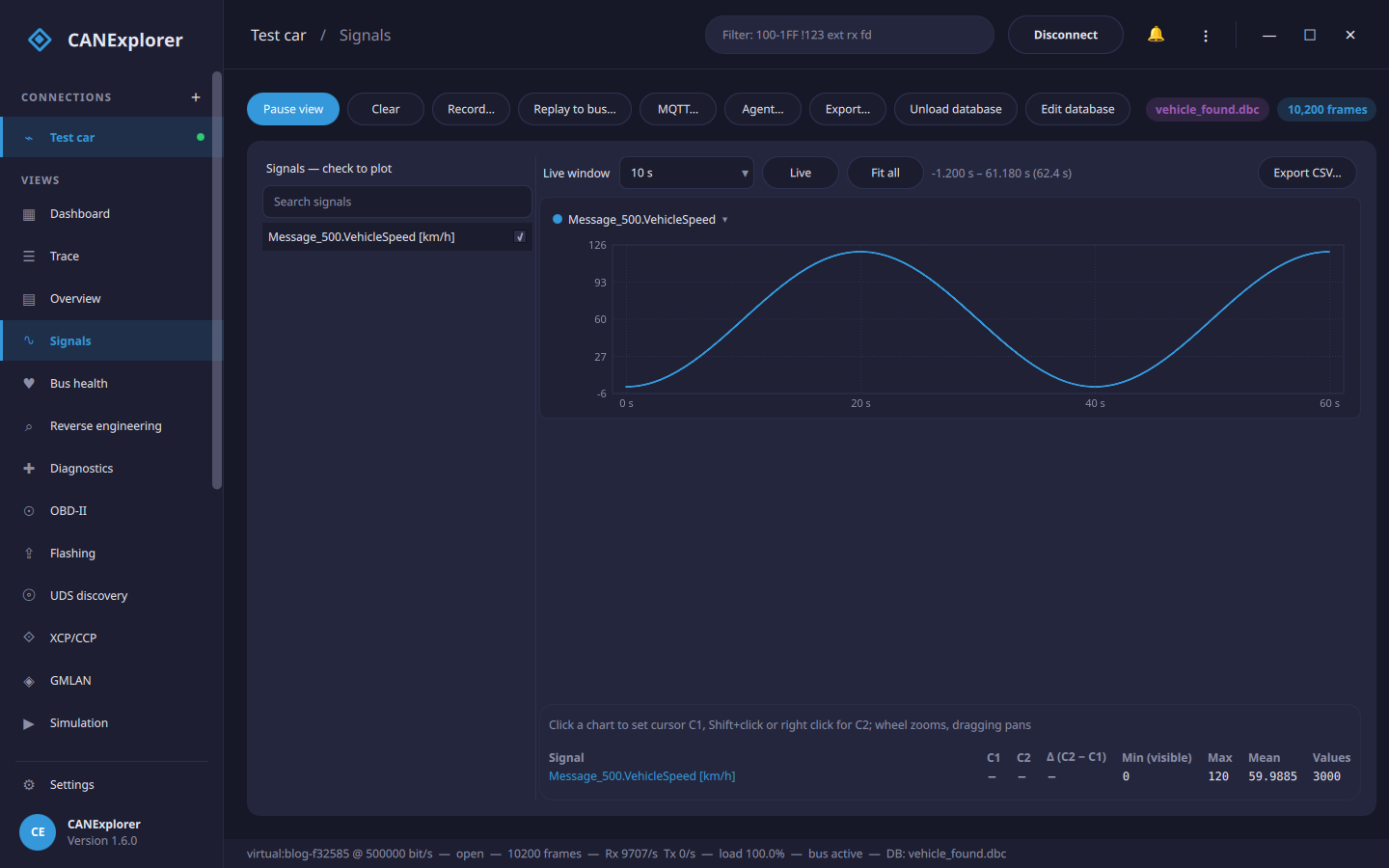
I loaded that DBC back into CANExplorer, ticked VehicleSpeed, and there it was — the signal Claude found, decoded live and plotted: 0 → 120 km/h, mean 60, straight off the previously-unknown 0x500.
From a wall of hex to a named, scaled, unit-tagged signal — and the only thing I did by hand was drive the car and say “yes.”
Why this works (and what it isn’t)
The division of labour is the interesting part:
- The tools do the maths.
analyze_identifier,bit_activity,extract_fieldandcorrelateare the same reverse-engineering engine CANExplorer’s GUI uses. They find fields, measure bit activity, decode a candidate over time and fit it to a reference. None of that is the LLM guessing. - Claude does the judgement. Which identifier is worth a look, that a symmetric signed swing is steering, that 0–12000 ×0.01 is a plausible speed range, that a 14-bit find is really a 16-bit field, that correlation 1.00 with factor 0.01 closes the case. That’s the part that used to be my afternoon.
- It’s safe by construction. The server was read-only, so the agent physically could not send a frame. The one real-world action — driving the car to make the speed move — is something a human does; the agent just watches. (CANExplorer has
capture_reactionand amark/reaction_at_markersworkflow for exactly that: you perform an action a few times, the agent finds what reacts.)
And the caveats, because reverse-engineering a real car is messier than a tidy simulation:
- Real buses have hundreds of identifiers, checksums and rolling counters (the analyser flags those), E2E protection, and multiplexed messages where the meaning of a byte depends on another byte.
- Byte order and scaling are rarely this clean; a GPS log is a luxury — often you confirm with
capture_reactioninstead (“I pressed the brake — what changed?”). - Nothing here replaces a factory DBC for safety-relevant work. This is for understanding your own vehicle, bench rigs and research — on a bus you’re allowed to touch.
Try it
CANExplorer is open source: https://github.com/AKJ7/CANExplorer. The MCP server is built in (can-mcp for a standalone process, or the Agent… button to expose a bus the GUI already has open), and it works with any MCP client — Claude Code, Claude Desktop, or an agent you build. The tools, tiers and scripting examples are in the MCP interface docs.
Point an agent at your bench rig and let it go hunting. It’s oddly satisfying to watch.