MCP interface
CANExplorer speaks the Model Context Protocol, so an AI agent (for example Claude Desktop, or an agent you build) can inspect a CAN bus — and, when you allow it, run diagnostics or transmit — through a small set of tools. There are two ways to expose a bus:
- the in-app server, hosted by the GUI for a connection it already has open, so the agent sees the same live bus you do — described first below, and
- the
can-mcpcommand, a standalone process that opens its own bus over stdio.
Both expose the same tools, resources and prompts, and both are read-only until you grant more with a permission tier.
In-app server (attach an agent to the live bus)
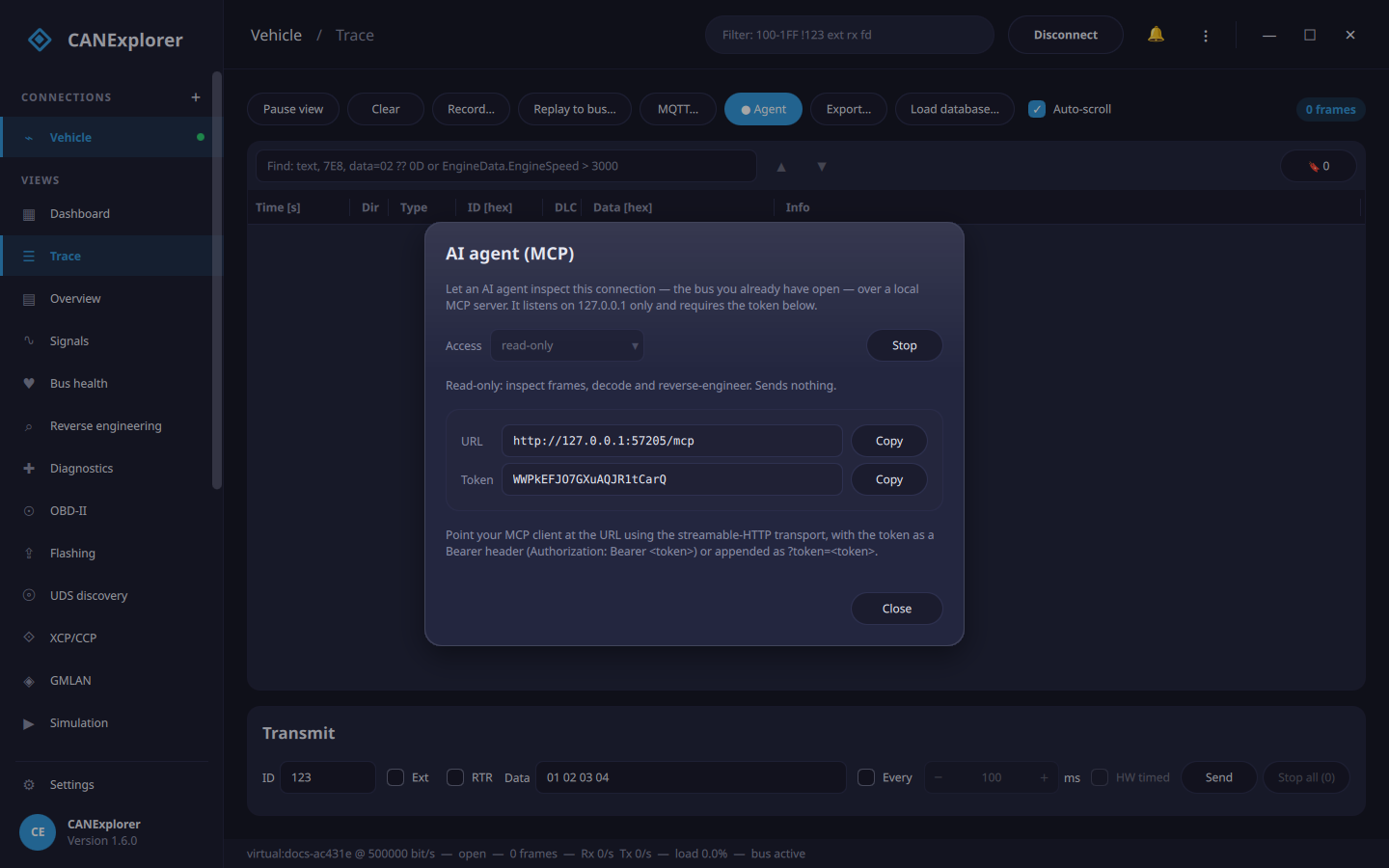
The GUI can host the MCP server for a connection it already has open, so the agent works on the same live trace
you are watching. This is the way to attach an agent to a bus the GUI is using: most USB/serial adapters are
single-access, so a separate can-mcp process cannot open the same channel at the same time.
Start it from a connection's Trace toolbar: the Agent… button opens the dialog above. Choose the
access tier (read-only by default), press Start, and the server binds to 127.0.0.1 on a free port and shows
a URL and a token. The button turns into ● Agent while it is running; press it again to stop. The agent
cannot open or close the bus — you manage that from the GUI — but the permission tiers apply
exactly as for the command.
Communicate with it over the streamable-HTTP transport, passing the token on every request as either an
Authorization: Bearer <token> header or a ?token=<token> query parameter. A request without the right token is
rejected. See connecting a client for a config entry and scripting for a
runnable example.
A listening server is a bigger surface
The in-app server is off by default and loopback-only, and the token gates it — but an agent on a control or
send tier can reset ECUs, clear codes or transmit on your live bus. Start it deliberately, and prefer
read-only unless you need more.
The can-mcp command (standalone)
can-mcp runs the same server as its own process, talking to one bus with python-can and answering the client's
tool calls over stdio. It is installed with CANExplorer (the mcp package is a core dependency), so the
can-mcp command and the in-app server are available out of the box.
The simplest form takes no arguments — the agent lists the interfaces and connects to one itself, and loads a database if it needs one:
Everything else is optional. Give a bus up front if you prefer it opened at start:
can-mcp -i socketcan -c can0                 # open this bus immediately (read-only)
can-mcp -i socketcan -c can0 -d vehicle.dbc  # …and decode frames into named signals
Either way the connect(interface, channel) and disconnect tools are always available, so the agent can open or
switch buses at any time, and load_database / unload_database load or clear a database at runtime. (Omitting
--interface and --channel just means the server starts unconnected; give both, or neither.)
Add a permission flag to allow more — for example --allow-diagnostics for OBD-II and UDS reads, or --allow-send
for full transmit. See can-mcp for all options.
Reads are the default; grant the rest deliberately
Without a permission flag the agent can only read the bus. Grant --allow-diagnostics, --allow-control or
--allow-send only on a bus you are allowed to use that way, and remember the agent then decides what is sent
— a --allow-control or --allow-send server can reset ECUs, clear trouble codes or transmit arbitrary
frames.
Connecting a client
A stdio client (the common case) launches can-mcp itself from a config file. The simplest entry is just the
command; the agent connects and picks a bus:
To pin a bus (and a database, and permissions), add them as args:
{
  "mcpServers": {
    "canexplorer": {
      "command": "can-mcp",
      "args": ["-i", "socketcan", "-c", "can0", "-d", "/path/vehicle.dbc", "--allow-diagnostics"]
    }
  }
}
The in-app server is already running, so a client attaches to its URL over streamable-HTTP instead of launching anything. For a client that reads an HTTP MCP server from config, point it at the URL from the Agent… dialog and send the token as a Bearer header:
{
  "mcpServers": {
    "canexplorer-live": {
      "url": "http://127.0.0.1:57205/mcp",
      "headers": { "Authorization": "Bearer WWPkEFJO7GXuAQJR1tCarQ" }
    }
  }
}
(The port and token change each time you start the server — copy them from the dialog. A client that cannot set
headers can instead use the URL with ?token=WWPkEFJO7GXuAQJR1tCarQ appended.)
Scripting
Any MCP client library works; the examples below use the official mcp Python SDK,
which CANExplorer already depends on.
Against the in-app server (streamable-HTTP + token). Copy the URL and token from the Agent… dialog:
import asyncio

from mcp import ClientSession
from mcp.client.streamable_http import streamablehttp_client

URL = "http://127.0.0.1:57205/mcp"      # from the Agent… dialog
TOKEN = "WWPkEFJO7GXuAQJR1tCarQ"        # from the Agent… dialog


async def main():
    headers = {"Authorization": f"Bearer {TOKEN}"}
    async with streamablehttp_client(URL, headers=headers) as (read, write, _):
        async with ClientSession(read, write) as session:
            await session.initialize()

            tools = await session.list_tools()
            print("tools:", [tool.name for tool in tools.tools])

            status = await session.call_tool("bus_status", {})
            print(status.content[0].text)

            # Every identifier seen, with direction, count and cycle time
            identifiers = await session.call_tool("list_identifiers", {})
            print(identifiers.content[0].text)

            # Reverse-engineer one identifier's fields
            analysis = await session.call_tool("analyze_identifier", {"identifier": "1A0"})
            print(analysis.content[0].text)

            # Resources can be read directly, like documents
            resource = await session.read_resource("can://status")
            print(resource.contents[0].text)


asyncio.run(main())
Against can-mcp over stdio — the client launches the process (here on a virtual bus, with diagnostics
allowed):
import asyncio

from mcp import ClientSession, StdioServerParameters
from mcp.client.stdio import stdio_client


async def main():
    params = StdioServerParameters(
        command="can-mcp",
        args=["-i", "virtual", "-c", "test", "--allow-diagnostics"],
    )
    async with stdio_client(params) as (read, write):
        async with ClientSession(read, write) as session:
            await session.initialize()

            # Read the vehicle's stored trouble codes over OBD-II (needs --allow-diagnostics)
            dtcs = await session.call_tool("obd_dtcs", {})
            print(dtcs.content[0].text)


asyncio.run(main())
A tool call returns a result whose content is a list of parts; the tools here answer with text (often JSON), read
from result.content[0].text. A tool that is not enabled by the current tier is not offered, so calling it fails —
grant the tier it needs first.
Permission tiers
The server is read-only by default. Each flag (or each dialog tier) grants the one below it as well, so
--allow-send / the send tier enables everything:
| Flag / tier | Adds | Tools |
|---|---|---|
(none) / read-only |
Connecting, inspection and reverse engineering (reads files, sends nothing) | bus_status, list_interfaces, connect, disconnect, list_identifiers, get_frames, decode_frame, decode_protocol, timing, analyze_identifier, bit_activity, extract_field, related_signals, capture_reaction, mark, clear_markers, reaction_at_markers, correlate, promote_to_dbc, load_database, unload_database |
--allow-diagnostics / diagnostics |
Safe diagnostic reads (they put a request on the bus) | query_obd, obd_status, obd_dtcs, obd_vin, obd_supported, obd_read, uds_read_did, uds_read_dtcs |
--allow-control / control |
Active diagnostics (changes ECU state) | obd_clear, uds_reset, uds_routine, uds_request |
--allow-send / send |
Arbitrary transmit | send_frame, send_message |
A tool that is not enabled is not even offered to the agent, so it cannot be called.
Tools
Inspection and reverse engineering (always available):
| Tool | Purpose |
|---|---|
bus_status |
Connection state, loaded database, enabled capabilities, frame counts, rates and bus load |
list_interfaces |
The CAN interfaces python-can can detect on this machine |
connect / disconnect |
Open a bus (interface, channel) and start receiving, or close it |
list_identifiers |
Every identifier seen, with direction, count, cycle time, last data and database name |
get_frames |
Recent frames (optionally of one identifier), decoded into signals |
decode_frame |
Decode a payload you supply with the loaded database (sends nothing) |
decode_protocol |
Interpret a payload with a protocol decoder (J1939, NMEA 2000, CANopen, ISO-TP, UDS, LIN, J1587) |
timing |
Inter-frame timing per identifier: cycle time, jitter, periodic vs event-triggered (series for the Δt over time) |
analyze_identifier |
Automatic field analysis (checksums, counters, multiplexers, physical values, states, flags) |
bit_activity |
Raw per-bit behaviour of one identifier (how often each bit is set and flips) and a per-byte summary |
extract_field |
Decode a candidate bit range (byte order, sign, scaling) over time without a database, to test a hypothesis |
related_signals |
Groups of fields that carry the same signal across the bus |
capture_reaction |
Diff a recent action window against the baseline before it to find what changed (a single action) |
mark / clear_markers / reaction_at_markers |
Mark the moments of a repeated action, then find the fields that react at them |
correlate |
Rank fields by how well they follow a reference (a database signal, a CSV column, or an inline series) |
promote_to_dbc |
Write the found fields — or field specs you supply (fields=[…]) — as signals to a DBC, creating their messages |
load_database / unload_database |
Load a DBC/ARXML/KCD/SYM/DBF for decoding, or forget it (back to raw bytes) |
Diagnostics (--allow-diagnostics; the control tools need --allow-control):
| Tool | Purpose |
|---|---|
query_obd |
One OBD-II value (service 01) via a single-frame request |
obd_status / obd_vin |
MIL state and DTC count; the VIN |
obd_dtcs |
Stored (service 03) or pending (service 07) trouble codes, decoded to P/C/B/U |
obd_supported / obd_read |
The supported PIDs; read and decode live values |
uds_read_did / uds_read_dtcs |
Read a UDS data identifier (0x22) or trouble codes (0x19) |
obd_clear |
Clear trouble codes and the MIL (service 04) — --allow-control |
uds_reset / uds_routine / uds_request |
ECU reset, routine control, or a raw UDS request — --allow-control |
Transmit (--allow-send): send_frame (a raw frame) and send_message (a database message by name, from its
signal values).
Identifiers are hex strings such as 1A0. The reverse-engineering tools are the same engine as the
Reverse engineering view, so an agent can run a full loop over MCP: survey the bus with
timing and list_identifiers, analyze_identifier, match a field to a reference with correlate or group them
with related_signals, and promote_to_dbc — then load_database and read the signals back decoded. The
diagnostics tools let it read and explain a vehicle's trouble codes over OBD-II or UDS.
Resources and prompts
The server also exposes the bus as read-only MCP resources, so a client can browse (or read_resource) them
like documents: can://status, can://identifiers, can://frames and can://database.
And it ships guided prompts for the common workflows: reverse_engineer_identifier, diagnose_trouble_codes
and find_signal.
How it relates to the rest of CANExplorer
The can-mcp command is separate, like can-server; it does not need the GUI. It works with any
python-can interface, so it can also sit on top of a remote bus (--interface canexplorer_remote)
shared by can-server on another machine — another way to share one bus between the GUI and an agent.