CANopen
Connections with the CANopen protocol have a CANopen view in the sidebar: a CANopen master to control the nodes' states (NMT), read and write their object dictionaries (SDO), and see their PDOs and emergency messages. The trace decodes the same traffic, see Protocol decoding.
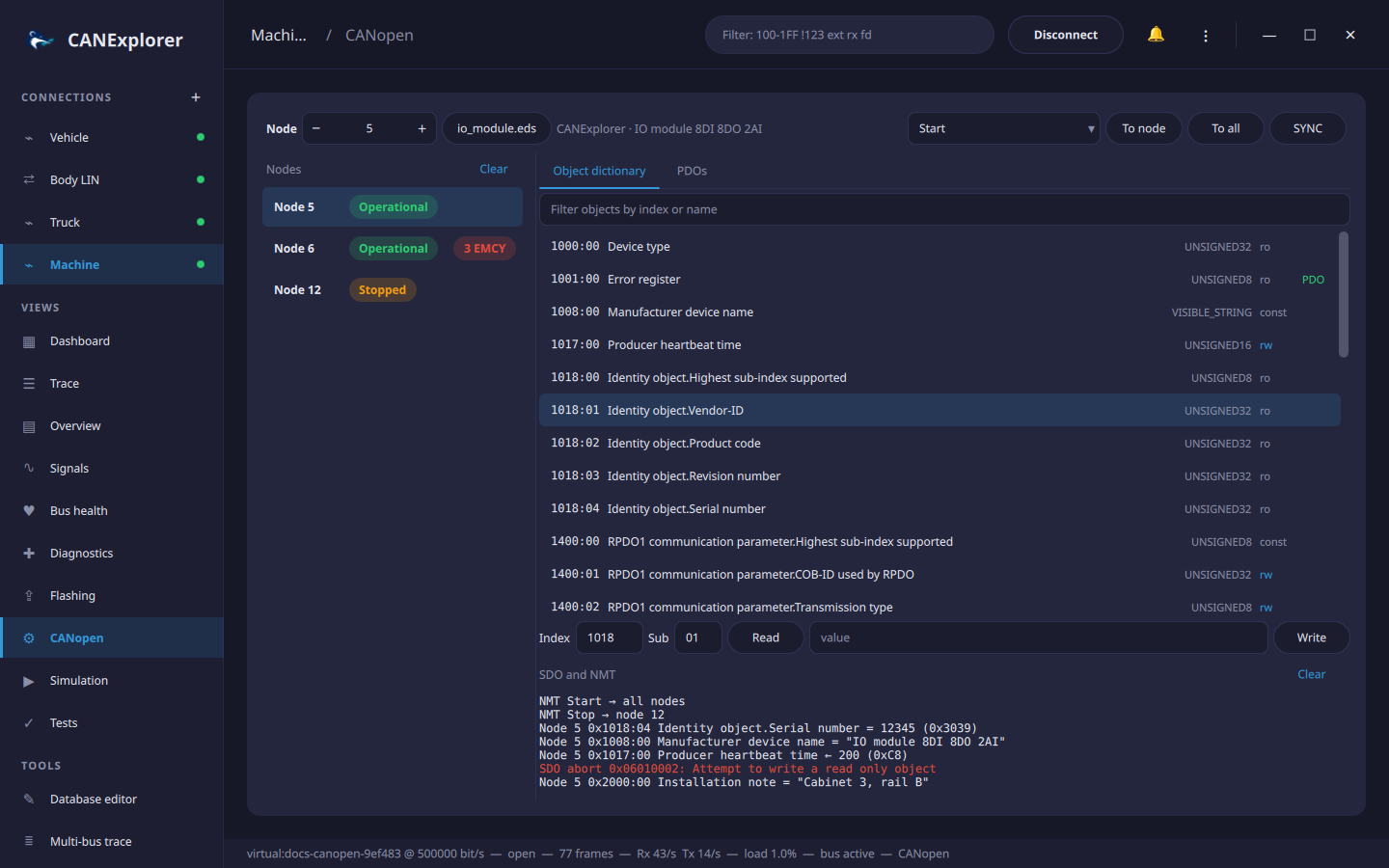
Nodes
Every node sending heartbeats, boot-up messages, emergencies, TPDOs or SDO responses is listed with its NMT state: Pre-Operational, Operational, Stopped or Boot-up. Nodes without a heartbeat show Unknown; their state appears once they send one (object 0x1017, Producer heartbeat time). Clicking a node selects it for the dictionary, SDO and PDO functions, as does the Node field at the top.
Emergency messages (EMCY) are counted per node; the list below the nodes shows those of the selected node, newest first, with the error code and its meaning (e.g. 0x8130 Life guard or heartbeat error). Hovering a message shows the error register and the manufacturer specific bytes. 0x0000 (error reset) is shown in green.
NMT and SYNC
Choose an NMT command (Start, Stop, Enter Pre-Operational, Reset Node, Reset Communication) and send it To node (the selected node) or To all nodes. SYNC sends one SYNC message (COB-ID 0x080), which makes nodes send their synchronous TPDOs.
Object dictionary
Object dictionary… loads the node's electronic data sheet (EDS) or device configuration file (DCF). The
dictionary lists every object and sub-index with its name, data type and access (ro, wo, rw, rwr, rww,
const); PDO marks objects that can be mapped to PDOs. The filter field finds objects by index or name.
A DCF also sets the node ID, and its configured values (ParameterValue) are used instead of the defaults.
Clicking the file name unloads the dictionary.
Clicking an object fills in its index and sub-index. Read uploads the value from the node, Write downloads the value in the field:
- With a dictionary, values are shown and entered in the object's data type: numbers in decimal or
0xhex, floats, strings as text. The values ofUNSIGNEDobjects are also shown in hex. - Without one, values are shown and entered as hex bytes, and only the standard objects (0x1000 to 0x1018) have names.
Up to 4 bytes are transferred in one expedited message, longer values (such as device names) segmented. The history below lists the results; failed transfers show the SDO abort code and its meaning, e.g. 0x06010002: Attempt to write a read only object, or that the node did not answer within one second.
PDOs
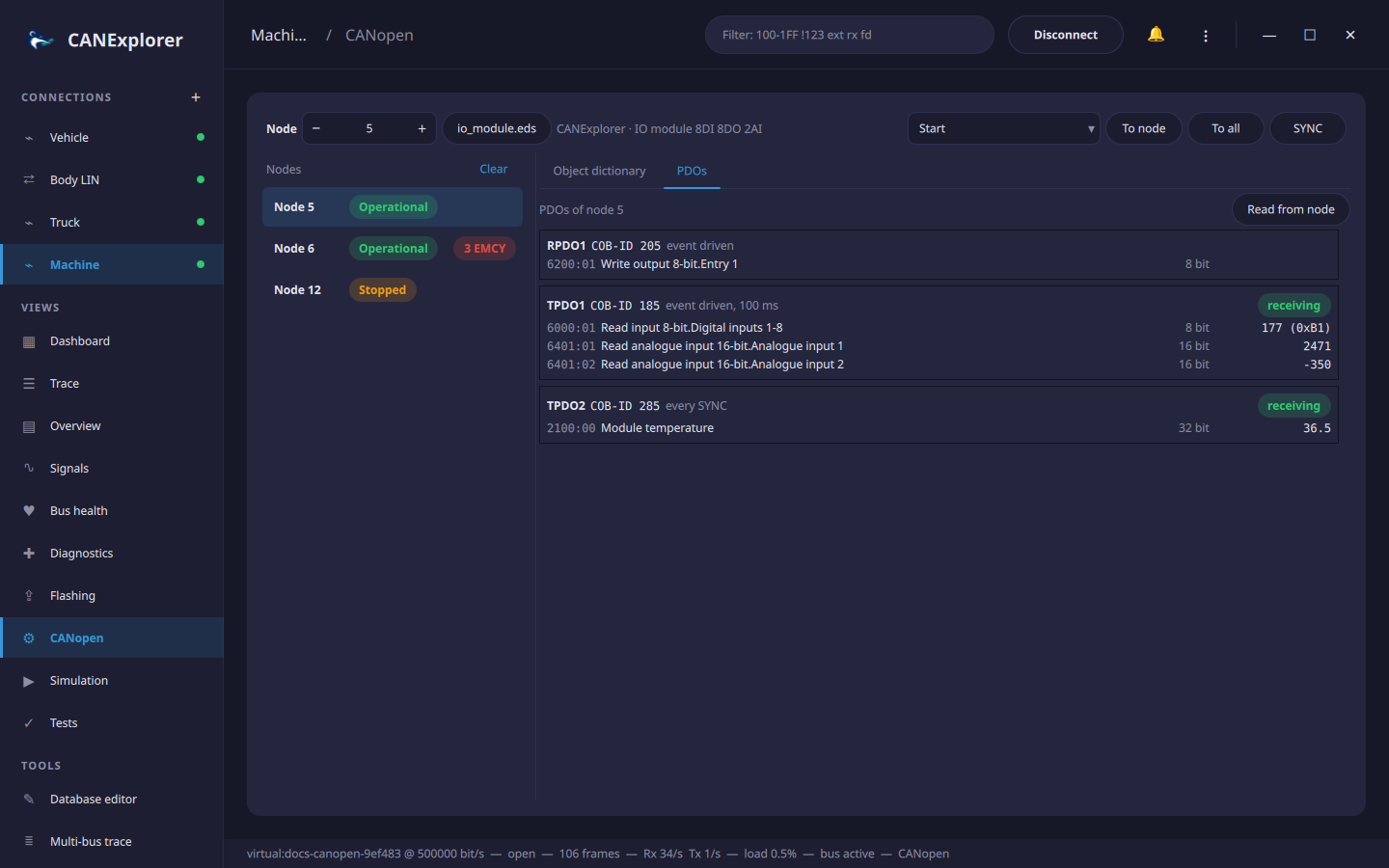
The PDOs tab shows the RPDOs and TPDOs of the selected node with their COB-ID, transmission type (event driven with the event timer, every SYNC, every n SYNCs, synchronous (acyclic) or remote request) and mapped objects. Received PDOs show the current values of the mapped objects, decoded with their data types; disabled PDOs (bit 31 of the COB-ID set) are dimmed.
The mapping comes from the loaded dictionary. Read from node reads the actual communication and mapping parameters of the first four RPDOs and TPDOs over SDO instead, which also works without a dictionary.
With a dictionary loaded, the trace names the objects in SDO messages of the selected node and shows the values in its PDOs:
SDO request node 5: read 0x1018:01 Identity object.Vendor-ID
TPDO1 node 5: Digital inputs 1-8=5, Analogue input 1=1200, Analogue input 2=-350
The NMT, SYNC, SDO and PDO functions use the predefined connection set (COB-IDs 0x600 + node ID for SDO requests, 0x580 + node ID for responses). They are not shown for log replays, where the view shows the nodes, emergencies and PDOs of the recording.
Try it without hardware
examples/canopen/io_module.eds describes a digital and analogue I/O module. Scripts can simulate it with
CanOpenNodeSimulator from can_explorer.core.canopen_tools, as the documentation screenshots do.