J1939
Connections with the J1939 protocol (chosen in the connection dialog or when replaying a log file) have a J1939 view in the sidebar. It shows the nodes on the bus with their address claims and trouble codes, and sends requests and parameter groups. The trace decodes the same messages, see Protocol decoding.
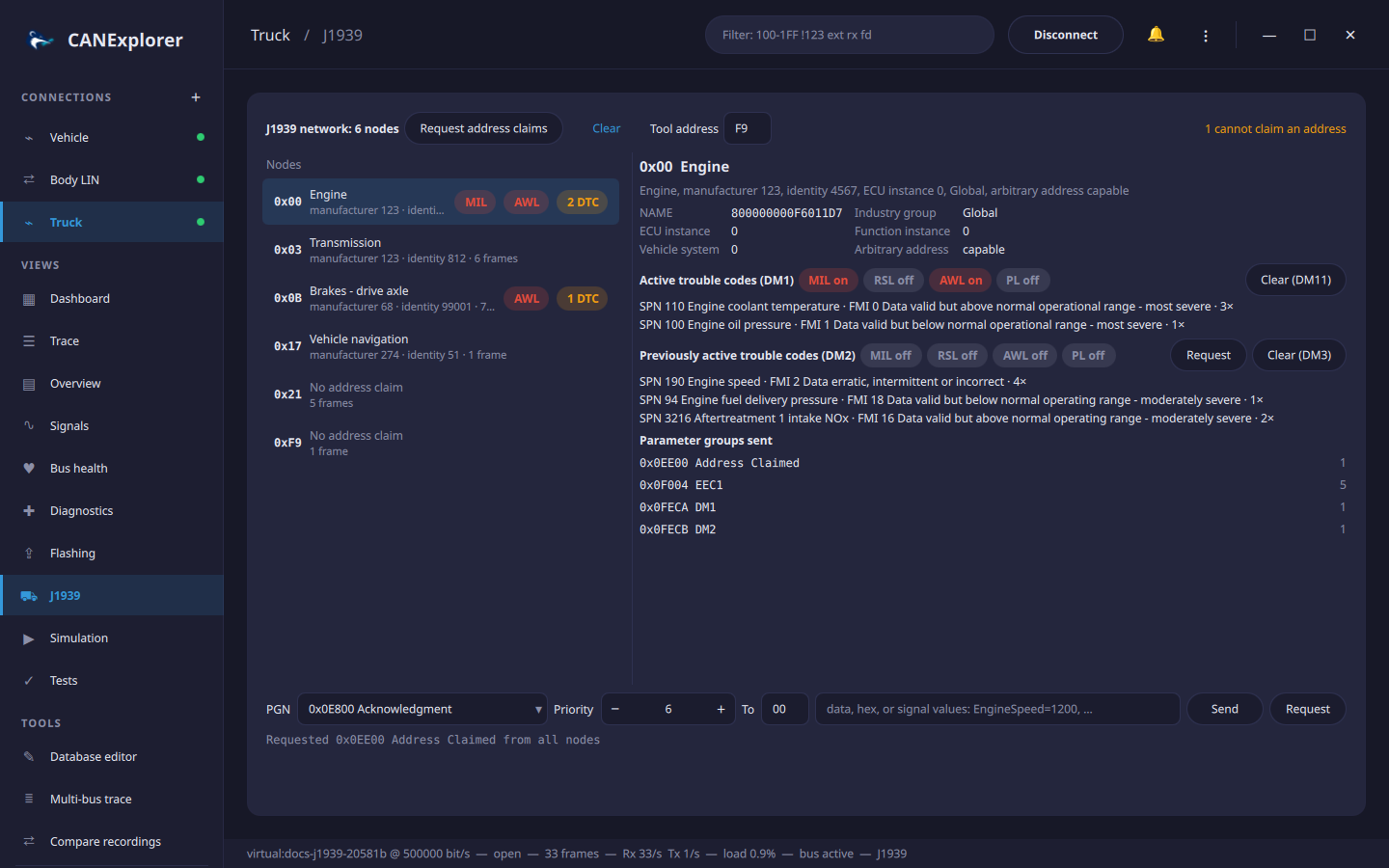
Nodes
Every source address seen on the bus is a node. The list shows the address, the function and the NAME's manufacturer code and identity number from the node's address claim, the number of frames, the lamps that are on and the number of active trouble codes. Nodes that did not claim their address since the view was opened or cleared show No address claim; Request address claims asks all nodes to claim again (a request for PGN 0xEE00 to the global address). Claims from the null address 0xFE, sent by nodes that cannot claim an address, are counted at the top right, with their NAMEs in the tooltip.
Selecting a node shows:
- The NAME, as a 64 bit value and its fields: industry group, ECU and function instance, vehicle system and whether the node can pick another address (arbitrary address capable).
- The active trouble codes of its last DM1, with the states of the malfunction indicator (MIL), red stop (RSL), amber warning (AWL) and protect (PL) lamps. Each code shows the suspect parameter number (SPN), with its name for common SPNs, the failure mode identifier (FMI) and the occurrence count.
- The previously active trouble codes of its last DM2. Request asks the node for DM2.
- Clear (DM11) clears the active and Clear (DM3) the previously active trouble codes of the node, by requesting DM11 or DM3 from it.
- The parameter groups the node sent, with the number of messages.
DM1 and DM2 messages with more than one trouble code use the transport protocol; they are reassembled first. Clear empties the list; it fills again with the traffic that follows.
Sending parameter groups
The row at the bottom sends a parameter group from the tool address (F9, the off-board diagnostic service tool, unless changed at the top):
| Field | |
|---|---|
| PGN | A name from the list, such as CCVS1, DM1 or a message of the loaded database, or a number: 0xFEF1 or 65265 |
| Priority | 0 (highest) to 7; 6 is the default of most parameter groups |
| To | Destination address in hex; FF sends to all nodes. Selecting a node fills in its address. Parameter groups from 0xF000 (PDU2 format) have no destination and are always sent to all nodes |
| Data | Hex bytes, e.g. FF 00 50 FF FF FF FF FF, or signal values of the database message of the PGN, e.g. WheelSpeed=80, ParkingBrake=1. Signals not given are sent as not available (all bits set), as J1939 prescribes |
Send sends up to 8 bytes as one frame. Longer data (up to 1785 bytes) is sent with the transport protocol: with BAM to all nodes, or with RTS/CTS to a single node, which then controls the flow with clear to send messages and confirms the end of the transfer. The result, or the error when the node does not answer or aborts, appears below the row.
Request asks the destination for the parameter group in the PGN field, e.g. Vehicle Identification or
Software Identification; its answer appears in the trace and, for address claims and DM2, in the node list.
The sending row is not shown for log replays.