Several buses
Vehicles and test benches have several networks, often joined by gateways: a powertrain CAN, a body CAN, LIN sub-buses. CANExplorer opens one connection per bus; the Multi-bus trace shows several of them on one timeline, and simulated gateways forward frames between them.
Multi-bus trace
Multi-bus trace under Tools in the sidebar merges the traces of the connections you tick, ordered by time, with the connection in the Bus column. It shows which frame on one bus caused which reaction on another, e.g. a CAN request and the LIN frames a gateway sends for it.
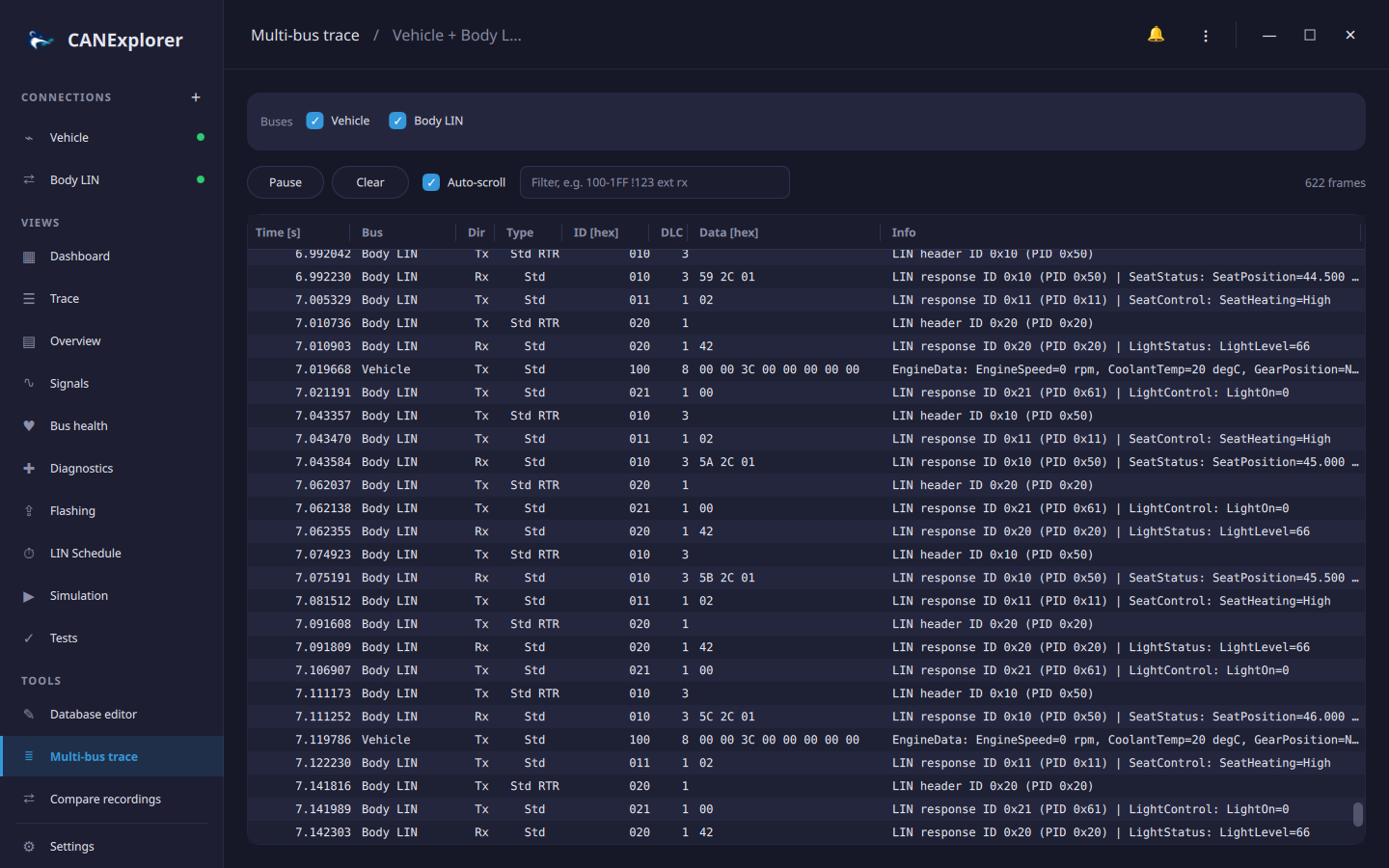
- Ticking a connection merges the frames its trace still holds; new frames follow while the connections receive. The view holds the latest 200 000 frames.
- The Info column decodes each frame with the protocol and database of its own connection.
- The filter field takes the display filter syntax and applies to all buses. Pause stops following; Clear empties the view (the connections keep their traces).
- Copy and Select All (Ctrl+C, Ctrl+A) work as in the trace of a connection.
Times are relative to the earliest start of the selected connections. Frames of different connections are ordered by their timestamps, so connections should use the same clock: live connections on one computer do; a log file replay has the timestamps of its recording.
Gateways and nodes on several buses
A simulation runs on its connection's bus, but its nodes can also receive and send on the other connections, named as in the sidebar:
from can_explorer.scripting import Node, on_message, on_signal


class SeatModule(Node):
    @on_signal('EngineData', 'EngineSpeed', bus='Powertrain')  # Decoded with the Powertrain database
    def engine(self, rpm, msg):
        self.send('SeatStatus', Heating=1 if rpm > 0 else 0, bus='Body LIN')

    @on_message(0x7DF, bus='Powertrain')
    def request(self, msg):
        self.send(0x7E8, [0x02, 0x7E, 0x00], bus='Powertrain')
bus= is accepted by @on_message, @on_signal, send and message; without it, the simulation's own
connection is meant. Message names are looked up in the database of that connection.
Gateway is a ready-made node forwarding frames from one bus to another:
from can_explorer.scripting import Gateway


class BodyGateway(Gateway):
    source = 'Powertrain'              # '' is the simulation's own connection
    target = 'Body'
    ids = ['EngineData', 0x3E0]        # Identifiers or database names; None forwards everything
    both_directions = False            # Also forward these identifiers from Body to Powertrain

    def transform(self, msg, to_bus):  # Optional: change or drop (return None) frames on the way
        frame = super().transform(msg, to_bus)
        if msg.id == 0x3E0:
            frame.arbitration_id = 0x3E1
        return frame
Only received frames are forwarded, never those sent on a bus (by the gateway or another node), so two-way
gateways do not loop. forwarded counts the frames a gateway sent. Starting a simulation that names a connection
which does not exist fails with the names of the existing ones.