Flashing
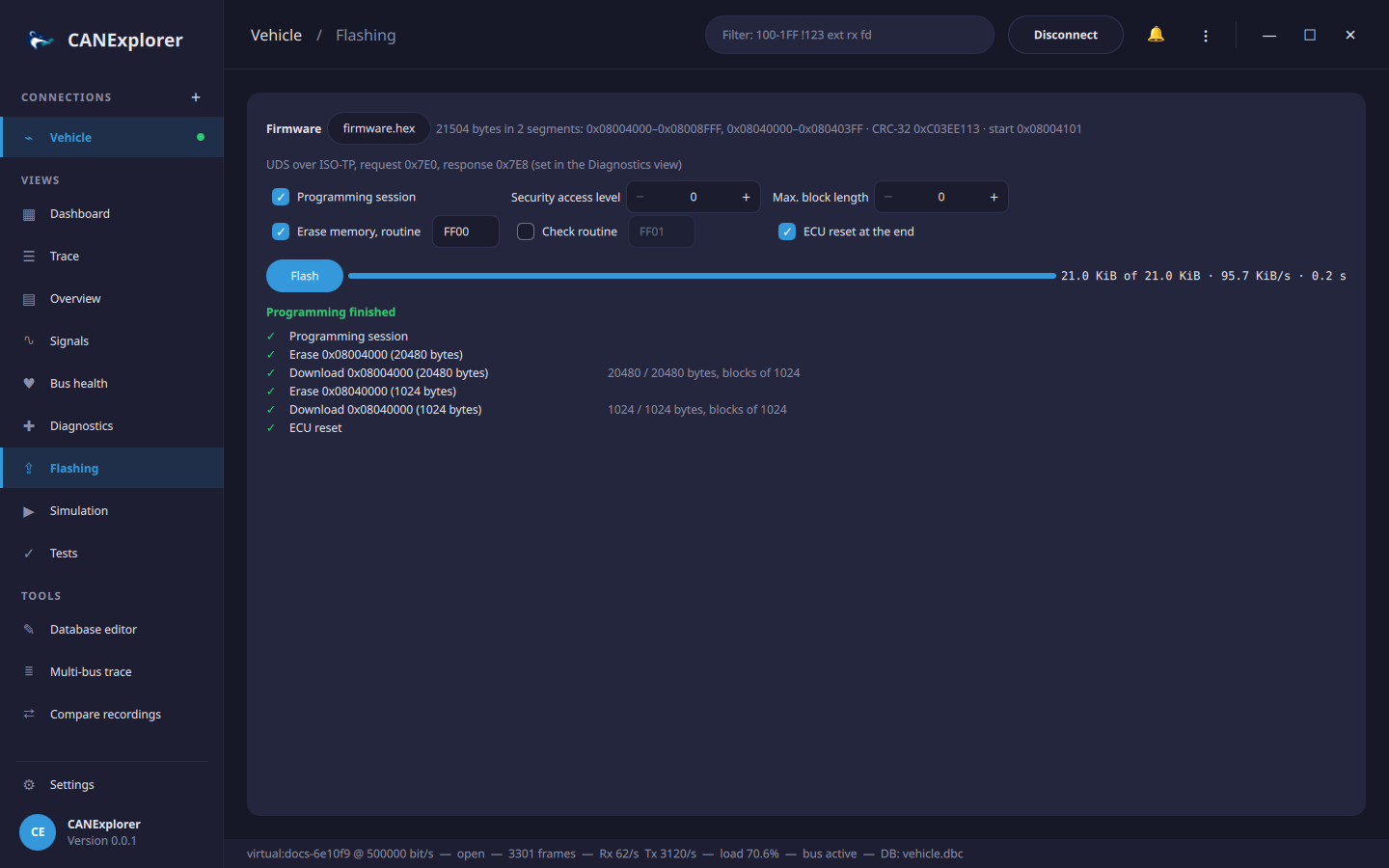
The Flashing view programs an ECU over UDS (ISO 14229) with a firmware file: it downloads each segment with RequestDownload (0x34), TransferData (0x36) and RequestTransferExit (0x37) and shows the progress. It uses the transport and addressing of the Diagnostics view: ISO-TP with the request and response identifiers set there on CAN, the LIN transport layer with the NAD on LIN.
Programming can make an ECU unusable
An interrupted or wrong download can leave an ECU without a working application. Use the files and the sequence of the ECU's manufacturer, keep the power supply stable, and do not disconnect during flashing.
Firmware files
Open file… loads:
| Format | Extensions |
|---|---|
| Intel HEX (data, extended segment and linear addresses, start address) | .hex, .ihex, .ihx |
| Motorola S-record (S1/S2/S3 data, S5/S6 counts, S7/S8/S9 start address) | .s19, .s28, .s37, .srec, .mot |
| Binary, placed at the Base address (hex) shown for binary files | .bin and others |
Files with other extensions are recognised by their content. Checksums, record counts and overlapping addresses are checked when the file is loaded. The line next to the file shows the size, the segments (contiguous address ranges, each downloaded separately), the CRC-32 of the data and the start address.
Sequence
| Step | Request | Option |
|---|---|---|
| Programming session | DiagnosticSessionControl 0x02 | Programming session |
| Security access | SecurityAccess with the seed of the chosen level and the key computed by the key file of the Diagnostics view | Security access level (0: none) |
| For each segment: erase | RoutineControl start, routine FF00 (eraseMemory) with the segment's address and size | Erase memory |
| For each segment: download | RequestDownload with the address and size, TransferData blocks, RequestTransferExit | |
| Check | RoutineControl start of the given routine, e.g. FF01 (checkProgrammingDependencies) | Check routine |
| ECU reset | ECUReset hard reset | ECU reset at the end |
Addresses and sizes are sent with 4 bytes each (addressAndLengthFormatIdentifier 0x44), without compression or encryption (dataFormatIdentifier 0x00). The block size is the maximum the ECU returns in its RequestDownload response, at most 4095 bytes (the ISO-TP limit); Max. block length limits it further, e.g. for ECUs with small receive buffers. The block counter starts at 1 and wraps from 0xFF to 0x00. Response pending answers, common while erasing, are waited for.
Flash runs the steps, listed with their state, the bytes transferred, the transfer rate and the time left. Cancel stops after the current request. A failing step shows the ECU's negative response (e.g. securityAccessDenied or requestSequenceError) and the following steps are skipped.
Try it without hardware
The simulated ECU (UdsEcuSimulator with UdsServer from
can_explorer.core.simulation) accepts downloads in the programming
session and stores the data. examples/flashing/firmware.hex is an example firmware with two segments and
examples/flashing/simulator_key.py the simulator's key algorithm for security access.