Test automation
Test scripts check the behaviour of ECUs on the bus automatically: they send frames and signals, wait for the
responses, check values and cycle times, run diagnostic requests and give each test case a verdict. They run in the
Tests view of a connection, or headless with can-test on a build server.
Test scripts
A test script is a Python file with TestModule classes. Their methods marked with @testcase are the test
cases; they run in the order they are defined and get the test context t:
from can_explorer.testing import TestModule, testcase


class EngineTests(TestModule):
    """Engine control unit: cyclic status and speed control."""

    async def setup(self, t):                      # Before the first test case of the module
        t.variables['ignition'] = False

    @testcase
    async def engine_data_is_sent_every_100_ms(self, t):
        await t.expect_cycle_time('EngineData', 100, tolerance=0.1)

    @testcase(title='Speed follows the target', timeout=10)
    async def speed(self, t):
        t.variables['ignition'] = True
        t.variables['target_speed'] = 3000
        rpm = await t.expect_signal('EngineData.EngineSpeed', lambda rpm: rpm > 2900, timeout=4)
        t.log('reached', rpm, 'rpm')
        await t.expect_signal('EngineData.GearPosition', 'Second')   # Value table texts work too


class GearboxTests(TestModule):
    @testcase
    async def obd_vehicle_speed(self, t):
        t.send(0x7DF, [0x02, 0x01, 0x0D, 0, 0, 0, 0, 0])
        response = await t.expect_message(0x7E8, timeout=0.5)
        t.require(response is not None, 'response received')       # Ends the test case when it fails
        t.check_equal(response.data[1:3], bytes([0x41, 0x0D]), 'positive response')
The complete example, examples/testing/vehicle_tests.py,
tests the engine and gearbox of the simulation example.
What the test context offers
| Area | Methods |
|---|---|
| Checks | check(condition, text), check_equal(actual, expected, text, tolerance=0), check_range(value, minimum, maximum, text); require(...) and fail(text) end the test case, skip(reason) skips it |
| Sending | send('Message', Signal=value), send(buffer) with message('Message'), send(0x123, data) |
| Frames | wait_for_message(selector, timeout, condition), expect_message(...), expect_no_message(selector, duration), collect(selector, duration) |
| Signals | wait_for_signal('Message.Signal', expected, timeout), expect_signal(...) — expected is a value, a value table text or a function |
| Timing | measure_cycle_time(selector, duration), expect_cycle_time(selector, expected_ms, tolerance, duration), sleep(seconds), elapsed |
| Diagnostics | t.uds: a UDS client on the module's uds_request_id and uds_response_id |
| Simulation | t.variables: the shared variables of the connection's simulation |
| Log | log(*values) |
A selector is a frame identifier (0x7E8), a database message name ('EngineData'), a function of the received
message, or None for any frame. See the test API reference for all parameters.
Verdicts
| Verdict | When |
|---|---|
| passed | The test case ended and all its checks passed |
| failed | A check failed (the test case continues after check, ends after require or fail) |
| error | The test case raised an exception or exceeded its timeout (30 s unless set with @testcase(timeout=…)), or the setup of its module failed |
| skipped | The test case called t.skip(reason) |
A failing teardown turns the last test case of the module into an error. Skipped test cases do not fail a run.
Waiting for frames
Waits see the frames that arrive after they start. Responses can arrive while the test is still sending (simulated
nodes answer immediately), so the first wait after t.send also sees the frames that arrived since the send.
Frames the test sent itself are never seen.
Parameters and requirements
params runs a test case once per parameter set; each run is a test case of its own, named after its parameters
(or ids), with its own verdict:
@testcase(params=[800, 2000, 4000])
async def engine_reaches(self, t, speed): ...           # engine_reaches[800], engine_reaches[2000], ...

@testcase(params=[{'target': 1500, 'gear': 'First'}, {'target': 3000, 'gear': 'Second'}], ids=['low', 'high'])
async def gear_for_speed(self, t, target, gear): ...    # gear_for_speed[low], gear_for_speed[high]
A dict is passed as keyword arguments, a tuple as positional arguments, anything else as one argument after t.
requirements names the requirements a test case verifies, for traceability; requirements of a TestModule
applies to all its test cases:
class EngineTests(TestModule):
    requirements = 'REQ-ENG-001'

    @testcase(requirements=['REQ-ENG-002', 'REQ-GBX-001'])
    async def speed_follows_the_target(self, t): ...
The HTML report has a Requirements table with the verdict of every requirement (failed when any of its test cases
failed or had an error), JUnit XML lists them as requirement properties of the test cases, the Tests view shows
them with the test case, and can-test -r REQ-ENG-002 runs only the test cases of a requirement.
Running in the application
The Tests view is available for connections that can transmit.
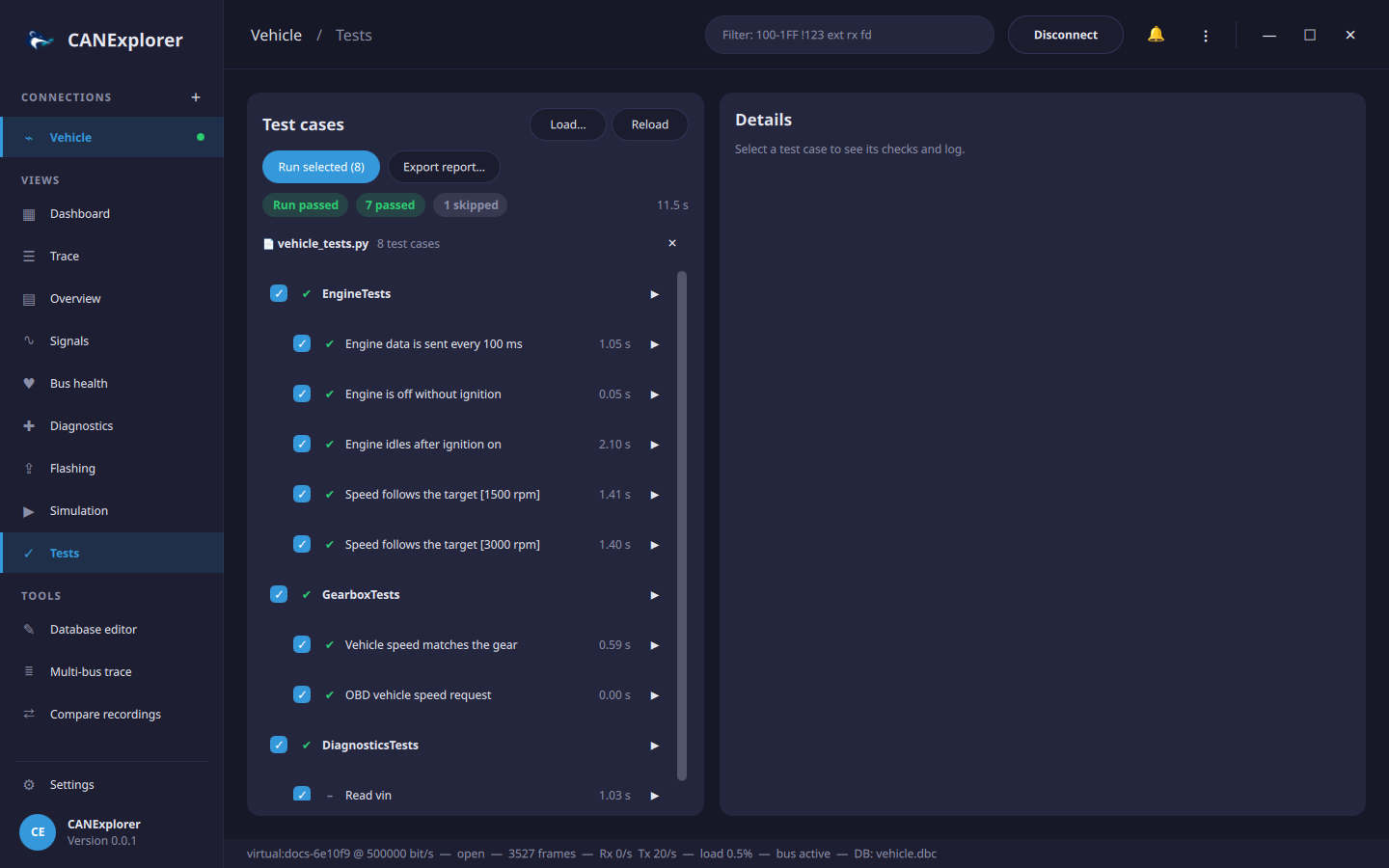
- Load… a test script (several can be loaded); Reload reads them again after editing.
- Select the test cases to run with the check boxes and press Run selected, or run one test case or module with its ▶ button (or a double click). Stop ends the run.
- The list shows the verdict and duration of each test case. Selecting one shows its log: checks (✔/✘), frames sent (→), log lines and errors.
- Export report… saves the results as an HTML report or as JUnit XML.
Tests use the connection's signal database, and t.variables are the variables of its simulation, so tests can
drive simulated nodes as well as real ECUs. Disconnecting stops a run.
Running on the command line
can-test runs test scripts without the user interface, e.g. on a build server, and returns 0 when all test cases
passed:
uv run can-test examples/testing/vehicle_tests.py \
    --database examples/simulation/vehicle.dbc \
    --simulation examples/simulation/engine_simulation.py \
    --report report.html --junit results.xml
PASS  EngineTests.engine_data_is_sent_every_100_ms (1.00 s)
PASS  EngineTests.engine_is_off_without_ignition (0.10 s)
PASS  EngineTests.engine_idles_after_ignition_on (2.10 s)
PASS  EngineTests.speed_follows_the_target[1500 rpm] (1.40 s)
PASS  EngineTests.speed_follows_the_target[3000 rpm] (1.40 s)
...
SKIP  DiagnosticsTests.read_vin (1.00 s)

8 test cases: 7 passed, 0 failed, 0 errors, 1 skipped in 7.7 s

7 requirements:
PASS  REQ-ENG-001 (5 test cases)
PASS  REQ-COM-010 (1 test case)
...
SKIP  REQ-DIAG-002 (1 test case)
With --simulation, simulated nodes run on the same bus, so the tests run without hardware; for a real bus give
the interface, e.g. --interface socketcan --channel can0 --bitrate 500000. All options are listed in the
command line reference.
Continuous integration
The JUnit XML file is understood by GitHub Actions, GitLab CI, Jenkins and most other build servers, and
--markdown appends a summary with the requirements and the failed checks to a file, such as the job summary of
GitHub Actions:
- run: >
    uv run can-test tests/ecu_tests.py --interface socketcan --channel can0
    --junit results.xml --report report.html --markdown "$GITHUB_STEP_SUMMARY"
- uses: actions/upload-artifact@v4
  if: always()
  with:
    name: test-results
    path: |
      results.xml
      report.html
CANExplorer's own build workflow runs the example test suite against the example simulation this way on every push (the Example ECU tests job), so the reports of a run show what the example covers.