Bus gateway
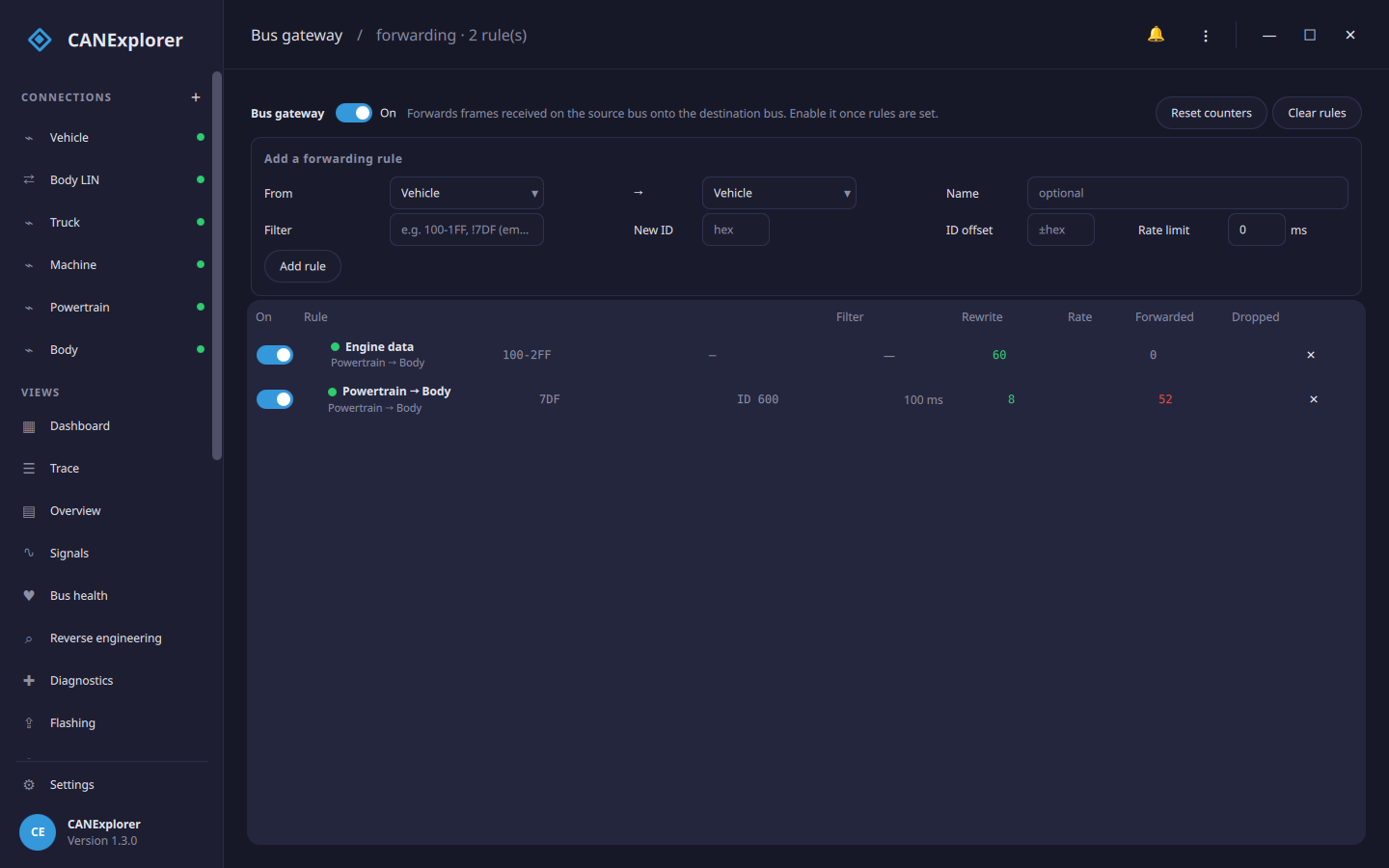
The Bus gateway tool in the sidebar forwards frames received on one connection onto another, with per-rule filtering, identifier rewriting and rate limiting. It turns CANExplorer into a configurable CAN gateway between two interfaces — useful on a bench or in a HIL setup to bridge two buses, inject a subset of one bus's traffic into another, translate identifiers between two address layouts, or protect a slower bus by rate-limiting what reaches it. Any pair of open connections works, including a real interface and the simulated one.
How it works
Each rule forwards frames received on a source connection to a destination connection. Only received bus traffic is forwarded — never frames CANExplorer itself transmits — so frames the gateway injects are not forwarded again, and two mirror rules between the same pair of buses cannot form a loop. (A short echo guard also ignores a forwarded frame that a bus with receive own messages reflects back.)
Turn the gateway On once the rules are set. It keeps running in the background while you use the rest of the application; the per-rule counters update live.
Adding a rule
| Field | Meaning |
|---|---|
| From / → | The source connection (frames come from its bus) and the destination (they are sent on its bus). The destination must be able to transmit. They must differ. |
| Name | An optional label; defaults to source → destination. |
| Filter | Which received frames to forward, in the filter syntax: identifiers and ranges in hex (100-1FF), ! to exclude, std/ext/fd. Empty forwards every frame. |
| New ID | Rewrite the identifier to this value. Most useful with a single-identifier filter, since every forwarded frame gets this identifier. |
| ID offset | Add this signed hex value to the identifier instead of rewriting it — e.g. +100 to shift a block of identifiers between two address layouts. Ignored when New ID is set. |
| Rate limit | The minimum milliseconds between forwarded frames of the same identifier; faster frames are dropped. 0 forwards everything. |
The payload, length, extended/FD flags and bitrate-switch bit are forwarded unchanged.
The rule list
Each rule shows a status dot — green when it is actively forwarding, amber when enabled but its connections are not both open, grey when switched off — its route, filter, rewrite, rate limit, and the number of frames forwarded and dropped. The On switch enables or disables a single rule; ✕ removes it. Reset counters zeroes the tallies and Clear rules removes them all.
A rule whose source or destination connection has been closed or removed is marked (connection missing) and forwards nothing until the connection is back; frames that cannot be sent (the destination is closed) count as dropped.
In scripts
can_explorer.core.gateway runs the same forwarding over BusSession objects, so a script can set up a gateway on
virtual buses without the GUI:
from can_explorer.core.filters import MessageFilter
from can_explorer.core.gateway import Gateway, GatewayRule

sessions = {'A': session_a, 'B': session_b}
gateway = Gateway(sessions.get)
gateway.set_rules([
    GatewayRule('powertrain', 'A', 'B', MessageFilter.parse('100-2FF')),
    GatewayRule('obd', 'A', 'B', MessageFilter.parse('7DF'), new_id=0x600, min_interval=0.1),
])
gateway.start()
...
print(gateway.rules[0].forwarded, gateway.rules[0].dropped)
gateway.stop()