XCP/CCP measurement & calibration
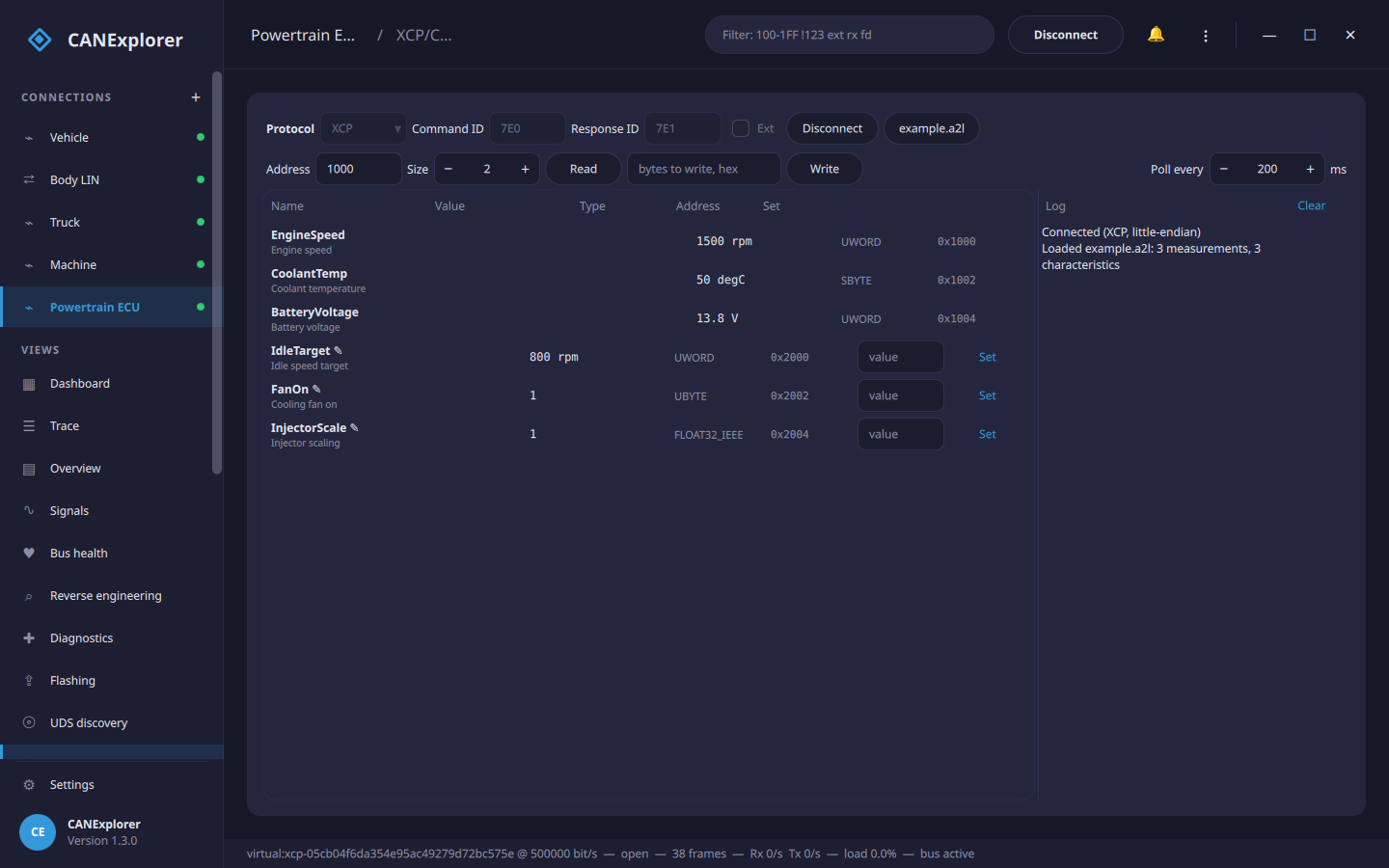
The XCP/CCP page of a connection reads and writes an ECU's internal variables over XCP (ASAM MCD-1 XCP) or CCP (the older CAN Calibration Protocol) on the connection's CAN bus. It is the measurement-and-calibration counterpart to the Diagnostics page: measurements are watched live and calibration values are read and changed, by address or — with an A2L file — by name in physical units.
Calibration changes the running ECU
Writing calibration values changes how the ECU behaves immediately. Do it on ECUs you own or are authorised to work on, on a bench, with the vehicle stationary and the power supply stable.
Open the connection to the ECU's CAN bus first, then go to the XCP/CCP page.
Connecting
| Field | Meaning |
|---|---|
| Protocol | XCP or CCP |
| Command ID | The CAN identifier the master sends commands on (XCP CMD, CCP CRO) |
| Response ID | The CAN identifier the slave answers on (XCP RES/ERR, CCP DTO) |
| Ext | 29-bit identifiers |
| Station (CCP) | The station address (hex) selecting the ECU on a shared bus |
| Byte order (CCP) | The ECU's byte order for addresses and values; XCP reports its own on CONNECT |
Connect performs the protocol's CONNECT handshake. XCP reads the slave's byte order and packet sizes from the response. Disconnect releases the ECU.
Reading and writing by address
Without an A2L you can still work directly with memory: enter an Address (hex) and a Size and Read the raw bytes (shown in the log), or enter bytes and Write them. XCP uses SHORT_UPLOAD / SET_MTA + DOWNLOAD and CCP uses SHORT_UP / SET_MTA + DNLOAD, split over several frames when needed.
A2L files
An A2L file (ASAM MCD-2 MC) describes the ECU's measurements and characteristics — their names, memory addresses, data types and conversions. A2L file… loads one and fills the table with:
- Measurements (read-only): polled live and shown in physical units, e.g. EngineSpeed 1500 rpm.
- Characteristics (marked ✎, writable): the calibration values. Type a number and Set to write it; the value is read back to confirm.
Values are converted with the A2L's linear scaling (IDENTICAL, LINEAR and the linear case of RAT_FUNC),
decoded with the data type (UBYTE…FLOAT64_IEEE) and the byte order. Poll every sets how often the
measurements are refreshed (50–5000 ms).
Curves, maps, verbal tables and non-linear formulae are not read; their values can still be reached by address.
Trying it without an ECU
can_explorer.core.xcp.XcpSlaveSimulator and can_explorer.core.ccp.CcpSlaveSimulator are simulated slaves backed
by a byte array, for trying the page and for test scripts. examples/calibration/example.a2l matches the memory a
simulated slave exposes (engine speed, coolant temperature, battery voltage, idle target, …).
In scripts
can_explorer.core.xcp and can_explorer.core.ccp drive XCP and CCP from test scripts:
from can_explorer.core.a2l import read_a2l
from can_explorer.core.can_command import CanCommandClient
from can_explorer.core.xcp import XcpClient

client = XcpClient(CanCommandClient(session, 0x7E0, 0x7E1))
await client.connect()
variables = {v.name: v for v in read_a2l('ecu.a2l')}
speed = variables['EngineSpeed']
print(speed.decode(await client.read(speed.address, 0, speed.size), client.byte_order), speed.unit)
idle = variables['IdleTarget']
await client.write(idle.address, 0, idle.encode(850.0, client.byte_order))
await client.disconnect()
CcpClient has the same read/write/connect/disconnect interface (with a station address).