J1850 VPW / GM Class 2
CANExplorer supports SAE J1850 VPW, the GM "Class 2" serial data bus of 1996–2007 GM vehicles — the bus the P01/P59 powertrain control modules of 1999–2006 GM trucks, vans and F-bodies talk on. It is not CAN: a single-wire 10.4 kbit/s bus with a three-byte header (priority, target, source) and an SAE J1850 CRC. CANExplorer reaches it through an ELM327/OBDLink adapter put into J1850 VPW mode.
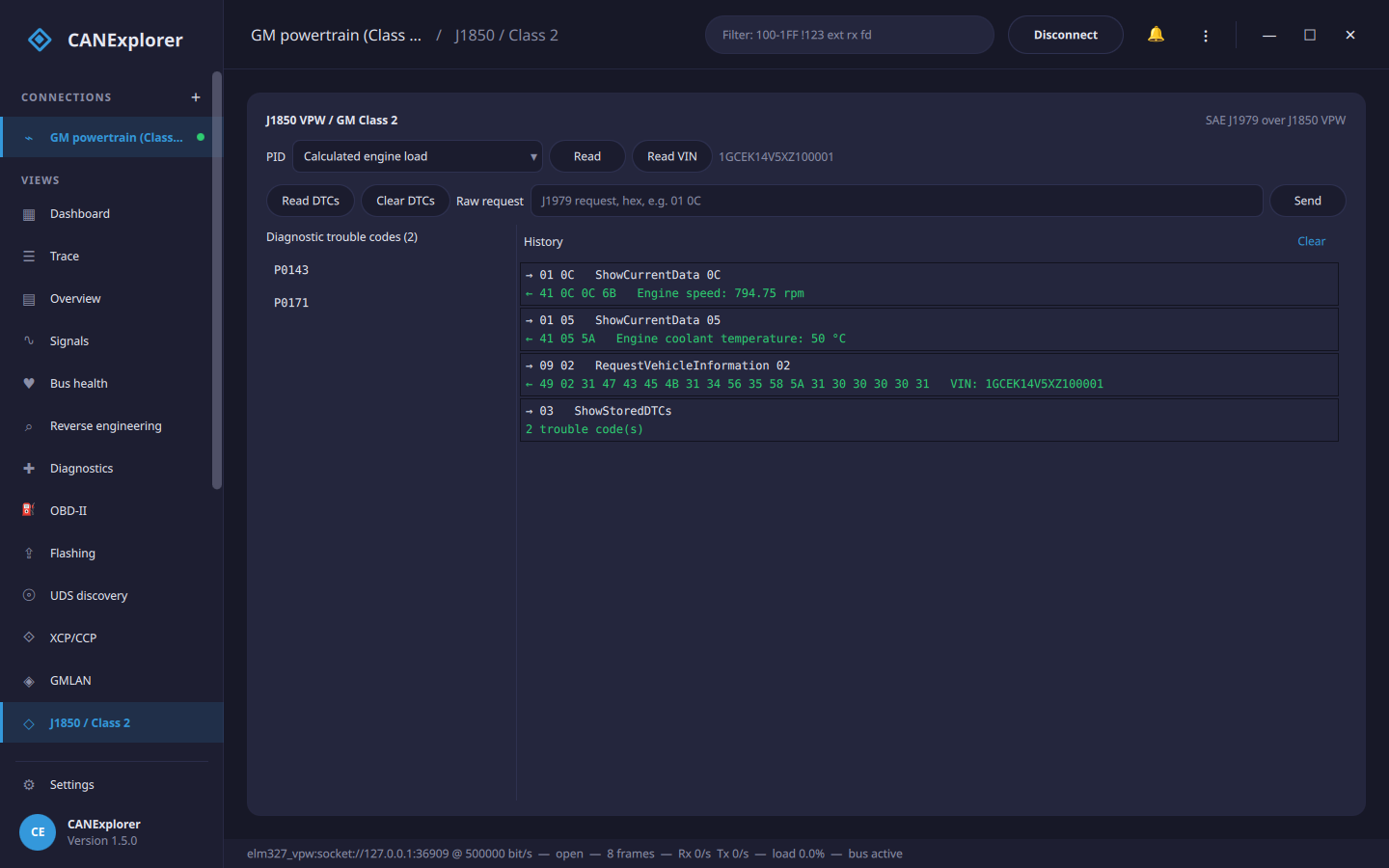
Connecting
In the new-connection dialog choose the elm327_vpw interface and give the adapter's serial
port as the channel — a USB port (COM4, /dev/ttyUSB0), a paired Bluetooth adapter (/dev/rfcomm0) or a WiFi
adapter (socket://192.168.0.10:35000), exactly as for the
ELM327 CAN interface. The adapter is set to protocol 2
(SAE J1850 VPW) automatically; the bitrate is fixed at 10.4 kbit/s.
Each VPW frame appears in the trace as a frame whose extended identifier holds the three header bytes (priority, target, source) and whose data is the payload, so the dashboard, filters, signal plots, reverse engineering and recording all work on a Class 2 bus as on any other. The adapter is half-duplex, so a frame on the bus while a diagnostic request is being sent is missed — fine for occasional requests, less so when polling hard.
Diagnostics (the J1850 / Class 2 page)
On an elm327_vpw connection a J1850 / Class 2 page appears, running SAE J1979 (OBD-II) over the bus
through the one shared adapter (no second connection to the dongle):
| Button | Service |
|---|---|
| Read (PID) | ShowCurrentData (mode 0x01): the chosen value — engine speed, coolant temperature, vehicle speed, load, throttle… — decoded to physical units |
| Read VIN | RequestVehicleInformation (mode 0x09) |
| Read DTCs | ShowStoredDTCs (mode 0x03): the trouble codes, shown as P0143, P0171… |
| Clear DTCs | ClearDTCs (mode 0x04): clear the stored codes and turn off the MIL |
| Raw request | Any J1979 request as hex bytes, e.g. 01 0C; the response is decoded in the log |
Clearing codes changes the vehicle
Clearing trouble codes turns off the malfunction indicator lamp and erases freeze-frame data. Use it on vehicles you own or are authorised to work on.
In scripts
can_explorer.core.j1850 drives Class 2 diagnostics from test scripts. A Class2EcuSimulator
on an in-memory bus allows trying it without a vehicle:
from can_explorer.core.j1850 import J1850Bus, J1850Client, Class2EcuSimulator

bus = J1850Bus()                        # In-memory Class 2 bus (no hardware)
Class2EcuSimulator(bus).start()         # A simulated P01/P59 PCM
client = J1850Client(bus.attach())

print(await client.current_data(0x0C))      # Engine speed (rpm)
print(await client.read_dtcs())             # ['P0143', 'P0171']
print((await client.vehicle_info(0x02)))    # VIN bytes
To talk to a real vehicle, swap the in-memory bus for an adapter transport from can_explorer.core.elm327_vpw: