UDS discovery
The UDS discovery page of a connection probes an ECU to find what diagnostic services, data identifiers, subfunctions and routines it exposes, when the documentation does not list them. It is an interactive UDS scanner for reverse engineering: it sends a request for every value in a range and lists the ones the ECU answers, classified so a positive response, a locked item and a wrong-session rejection stand out from the plain not supported replies.
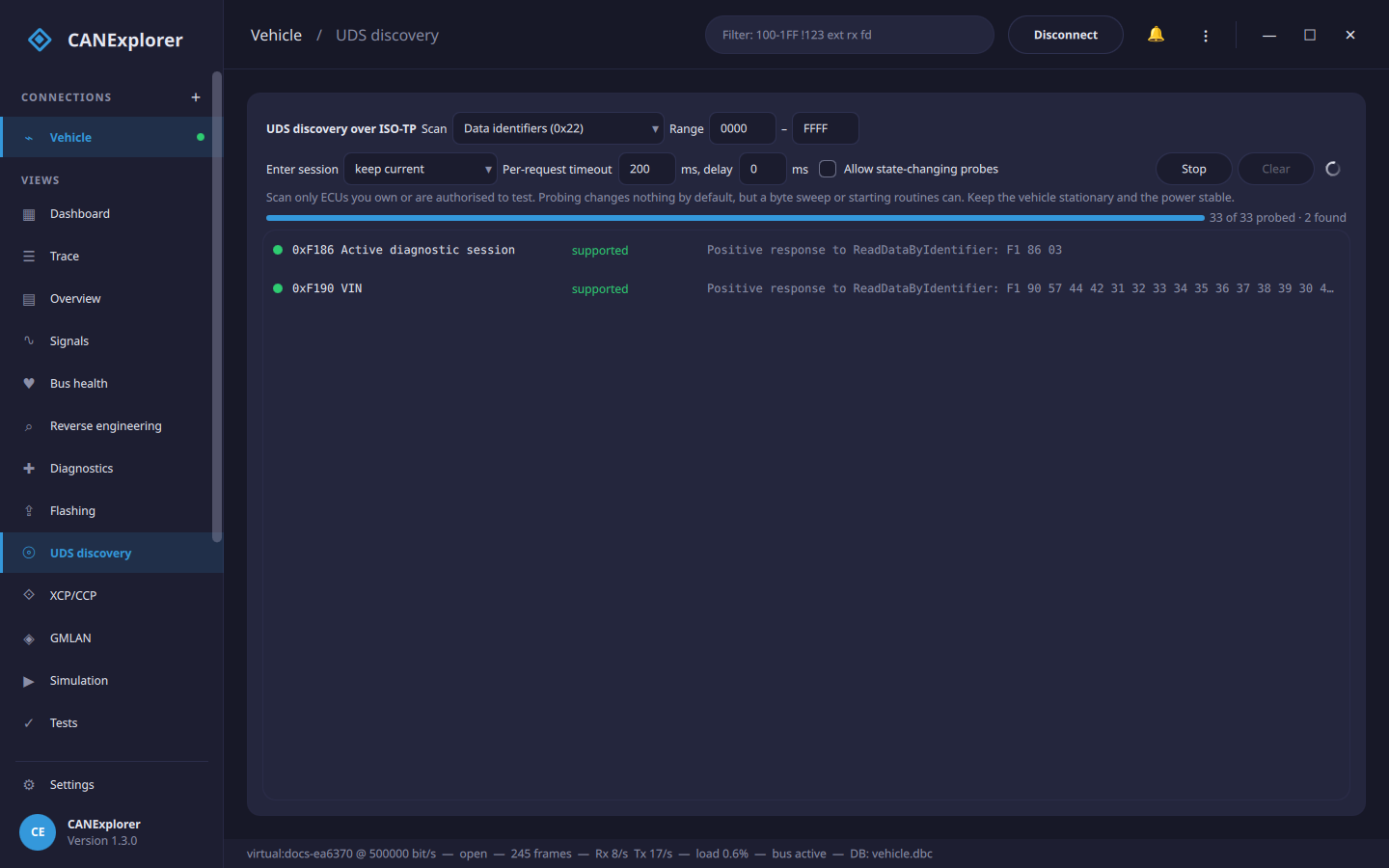
Only scan ECUs you are allowed to test
Run this against ECUs you own or have permission to test. A scan sends many requests in a short time; keep the vehicle stationary and the power supply stable. The service, DID, subfunction and routine request-results scans only read, but a byte sweep or starting routines can change the ECU, so those stay behind the Allow state-changing probes box.
It uses the transport and addressing of the Diagnostics view (ISO-TP on CAN, the LIN transport layer, or DoIP over Ethernet), so set the ECU's identifiers or address there first.
Scans
| Scan | What it sends | An item is listed when |
|---|---|---|
| Services | Each service identifier (the known UDS ones, or every SID 00–FF) |
the ECU answers anything but serviceNotSupported |
| Data identifiers | ReadDataByIdentifier (0x22) for each DID in the range | the DID returns data, or is locked behind security access |
| Subfunctions | A service with each subfunction 00–7F |
the subfunction is accepted or rejected for a reason other than subFunctionNotSupported |
| Routines | RoutineControl (0x31) for each routine identifier | the routine exists (by default with request results, which starts nothing) |
| Sweep one byte | A request template with one byte (or two) replaced by each value in the range | always listed when the answer is interesting; a free-form fuzz of a known request |
| Fuzz | Mutated requests (bit flips, boundary bytes, truncation, extension) from seed requests or random ones | a positive response to a malformed request, an unusual rejection, or the ECU going unresponsive |
Each found item is coloured by its answer:
- supported / present (green): a positive response. For a DID the response data is shown.
- locked (amber): securityAccessDenied and similar — the item exists but needs security access.
- wrong state/session (blue): the ECU rejected the request for the current session or state (e.g. serviceNotSupportedInActiveSession). Enter session changes the session before scanning to reach these.
- rejected (grey): any other negative response, which still proves the service or identifier is handled (for example incorrectMessageLengthOrInvalidFormat to a bare service probe).
- no response (hang?) (red, fuzzing only): the ECU stopped answering — a periodic liveness check (TesterPresent) no longer gets a reply, which may mean a hang or a crash. Fuzzing stops there so the cause can be found.
Items that answer serviceNotSupported or requestOutOfRange, and those that do not answer at all, are counted but not listed.
Fuzzing
Fuzz is a robustness test: it mutates requests and sends many of them to see how the ECU copes. Give it one or
more Seeds (requests to mutate, ; separated; empty fuzzes random requests from the known services), the number
of Iterations and a Seed number that makes the run reproducible — so a request that upset the ECU can be
found again by re-running with the same number. Every so often it checks the ECU still answers a TesterPresent; if
it does not, the run reports no response (hang?) and stops.
Fuzzing sends arbitrary, state-changing requests, so it needs Allow state-changing probes and is for ECUs you own or are authorised to test, on a bench, with the vehicle stationary and the power supply stable.
Running a scan
- Choose the Scan and its Range (hexadecimal). For subfunctions, set the Service; for routines, the control type; for a sweep, the request Template, the Byte to replace and its width; for a fuzz, the Seeds, Iterations and reproducibility Seed.
- Optionally Enter session (e.g. extended) before scanning, raise the Per-request timeout for a slow ECU, or add a delay between requests to go easier on the bus.
- Start. The progress shows how many values were probed and how many were found; Stop ends it early.
Click a found row to send that request again in the Diagnostics view, where its full response and decoding appear in the history and you can follow up on it (read the DID, run the routine, and so on).
The table keeps up to 2000 found items; narrow the range if a scan finds more.
In scripts
can_explorer.core.uds_scan runs the same scans over any UDS transport from test scripts, as
async iterators of ScanResult:
from can_explorer.core.isotp_client import IsoTpClient
from can_explorer.core.uds import UdsClient
from can_explorer.core.uds_scan import scan_services, scan_data_identifiers

client = UdsClient(IsoTpClient(session, 0x7E0, 0x7E8), timeout=0.2)

async for result in scan_services(client):
    if result.interesting:
        print(f'service 0x{result.identifier:02X}: {result.summary}')

async for result in scan_data_identifiers(client, 0xF180, 0xF1FF):
    if result.category == 'positive':
        print(f'{result.identifier:04X} = {result.response[3:].hex()}')
scan_subfunctions, scan_routines and sweep work the same way. Each takes an optional delay and an
asyncio.Event stop to end the scan. Over Ethernet, build the client on a DoIP transport
(UdsClient(client.transport(0x1001))).