MQTT
CANExplorer publishes the decoded signals of a connection, and optionally its frames, to an MQTT broker. Dashboards and home automation (Home Assistant, Node-RED, Grafana, a cloud IoT service) then use the bus data without knowing anything about CAN. Optionally, other programs send frames on the bus by publishing to a topic.
MQTT works in the application, for a connection, and in can-server, which publishes its buses without a user interface (for example from a Raspberry Pi in a vehicle).
Note
The installers contain MQTT. When running from source, install it with uv sync --extra mqtt.
Publishing a connection
- Load a signal database: signals are published by their names in the database. Without a database, only frames can be published.
- Click MQTT… in the connection's toolbar.
- Enter the Broker (
mqtt://HOST:PORT, ormqtts://HOSTfor TLS on port 8883), the User and password if the broker needs them, and the Topic prefix (defaultcanexplorer). - Choose what to publish and click Start.
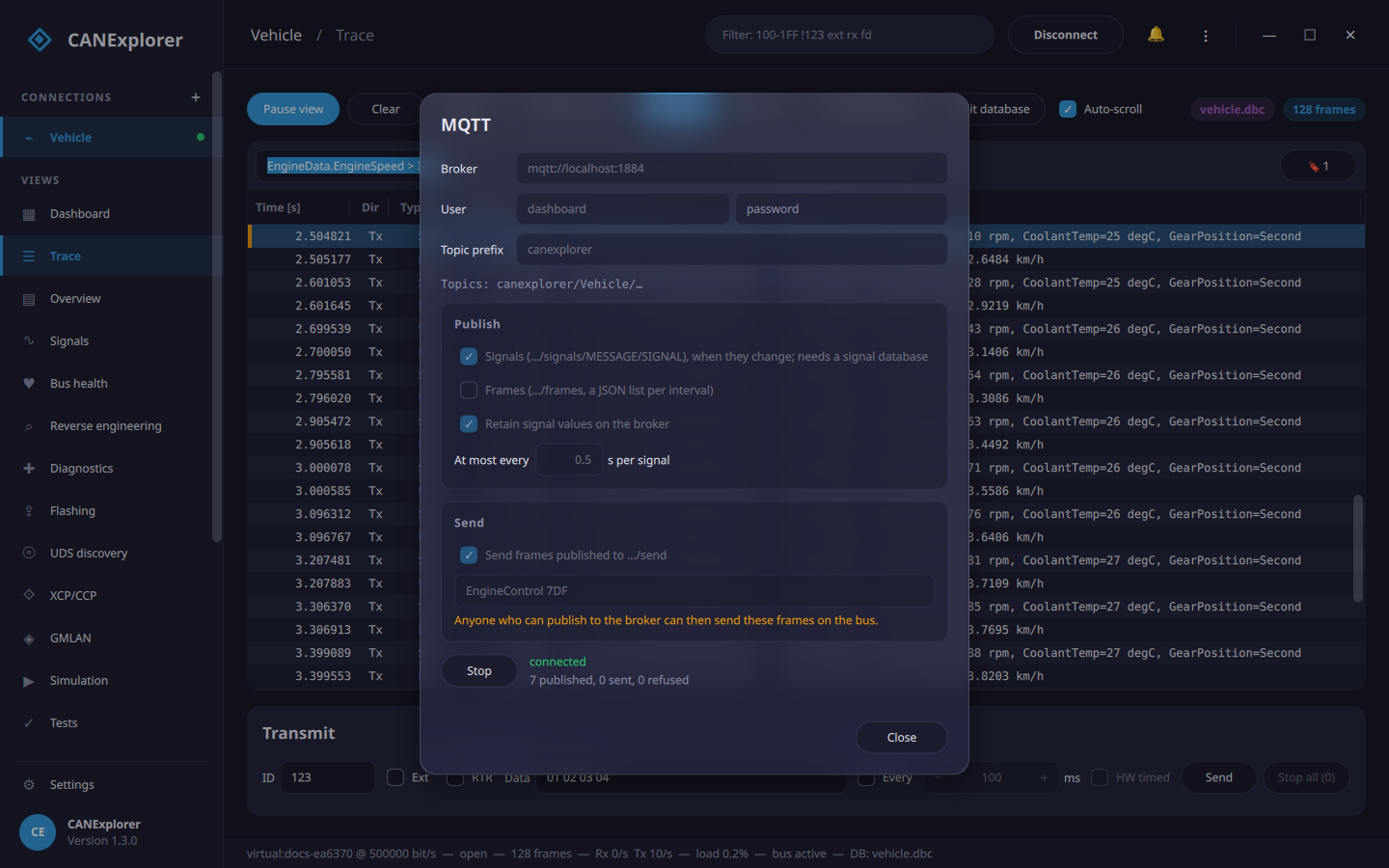
The button then reads ● MQTT, and the dialog shows the state (connected, or the error and the next retry) and how many messages were published. Publishing pauses while the connection is disconnected and resumes when it is connected again, until you click Stop. CANExplorer remembers the options, but not the password.
Topics
All topics start with PREFIX/CONNECTION, e.g. canexplorer/Vehicle. In names, /, + and # become _.
| Topic | Payload |
|---|---|
…/signals/MESSAGE/SIGNAL |
The signal's value as JSON: a number (2400.0), or the name of a value with a choice ("Second") |
…/frames |
Optional: the frames of each interval, as a JSON list of [timestamp, id, flags, data hex, dlc] |
…/status |
online or offline (retained; the broker publishes offline itself when the connection drops) |
…/send |
Optional: frames other programs want to send (see below) |
…/errors |
Why a send request was refused: {"error": "…"} |
A signal is published when its value changes, at most once per interval (At most every, default 0.1 s). With Retain signal values, the broker keeps the last value of every signal for new subscribers.
flags in frames are bits: 1 extended identifier, 2 remote frame, 4 CAN FD, 8 bit rate switch, 16 error state
indicator, 32 error frame, 64 received (not sent by this computer).
Try it with the Mosquitto command line tools:
canexplorer/Vehicle/status online
canexplorer/Vehicle/signals/EngineData/EngineSpeed 2400.0
canexplorer/Vehicle/signals/EngineData/GearPosition "Second"
Sending frames
With Send frames published to …/send, frames published to the send topic are sent on the bus. Only the
messages and identifiers in the allow list are sent; * allows all. The connection must be able to transmit.
# A database message by name; signals that are not given keep their initial value
mosquitto_pub -t canexplorer/Vehicle/send -m '{"message": "EngineControl", "signals": {"TargetSpeed": 2000}}'
# Raw data; identifiers above 7FF are extended, or set "extended": true
mosquitto_pub -t canexplorer/Vehicle/send -m '{"id": "7DF", "data": "02 01 0D"}'
Sending is remote control of the bus
Anyone who can publish to the broker can send the allowed frames on the bus, for example in a vehicle. Keep
the allow list short, use a broker with users and access control lists (so that only trusted clients may
publish to …/send), and use TLS (mqtts://) outside a trusted network.
Home Assistant
With Home Assistant's MQTT integration, a signal becomes a sensor:
mqtt:
  sensor:
    - name: "Engine speed"
      state_topic: "canexplorer/Vehicle/signals/EngineData/EngineSpeed"
      unit_of_measurement: "rpm"
      availability_topic: "canexplorer/Vehicle/status"
      payload_available: "online"
      payload_not_available: "offline"
Limits
- MQTT is made for values, not for every frame of a busy bus. Publish frames only on quiet buses or with a local broker; frames that pile up faster than they are published (more than 20 000 per interval) are dropped and counted.
- Signals are published at most once per interval, so short spikes between two publications are not seen. Record the bus for exact data.
- The connection to the broker is restored automatically; values that changed in the meantime are published then (only the latest value of each signal).