OBD-II
The OBD-II page reads a vehicle's emissions diagnostics (SAE J1979 over ISO 15765-4): the live values the ECU publishes, its trouble codes, and the VIN. It is the standard, manufacturer-independent interface every car built since the mid-2000s exposes on its OBD-II port — a 500 kbit/s CAN bus.
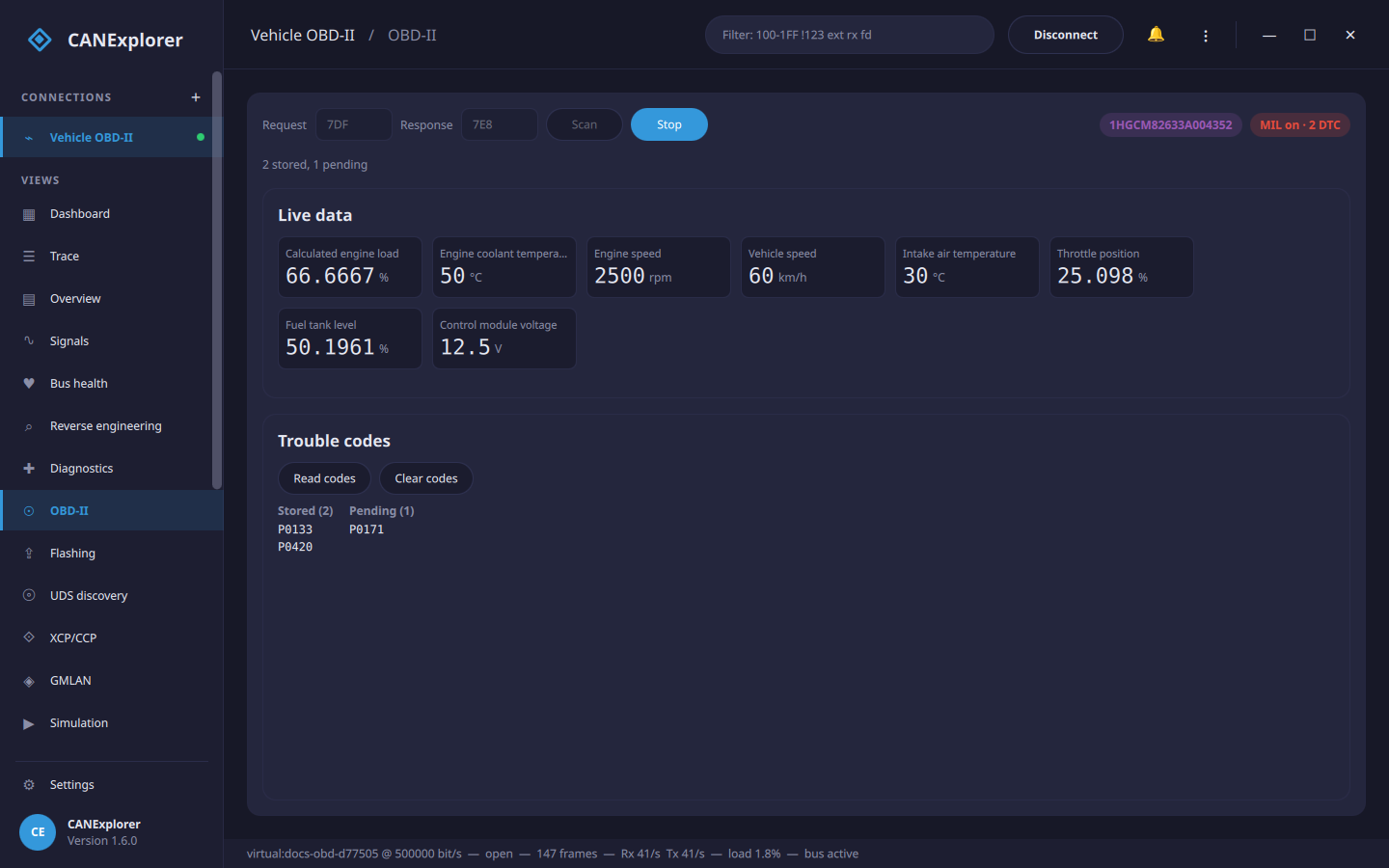
The page appears for CAN connections that can transmit (it sends requests). Connect to the vehicle, then press Scan.
Connecting
Requests go to 7DF, the OBD-II functional broadcast that every ECU answers, and answers come from 7E8 (the first ECU). If a vehicle does not respond to the broadcast, address one ECU directly by setting the request and response identifiers to 7E0 and 7E8 (7E1/7E9 for the second ECU, and so on).
Scan reads:
- the VIN (service 09),
- the MIL (the "check engine" lamp) and the number of stored trouble codes (service 01 PID 01), and
- the supported values — the PIDs the ECU offers (service 01 PID 00/20/…), of those CANExplorer can decode.
Live data
Live polls the supported values continuously and shows each as a tile — engine speed, vehicle speed, coolant and intake temperatures, engine load, throttle position, fuel level, control-module voltage and more, in their physical units. Stop ends the polling.
The same values can be recorded as references for reverse engineering from the Reference signals tab, to match them to the raw traffic.
Trouble codes
Read codes reads the stored codes (service 03, the ones that lit the MIL) and the pending codes
(service 07, seen once but not yet confirmed), decoded to their P/C/B/U form — for example P0133.
Clear codes sends service 04: it clears the stored codes and turns the MIL off. As the standard intends, this also clears freeze-frame data and resets the readiness monitors, so the car may need a drive cycle before it is ready to pass an emissions test again.
Scripting
The same OBD-II client is available as a library, so you can read a vehicle from a script without the GUI. Open a
bus with python-can, wrap it in the ISO-TP and UDS transports, and call ObdClient — its methods are coroutines, so
run them on an event loop:
import asyncio

from can_explorer.core.obd import ObdClient, FUNCTIONAL_REQUEST, ECU_RESPONSE
from can_explorer.core.isotp_client import IsoTpClient
from can_explorer.core.session import BusSession
from can_explorer.core.sources import BusConfig, LiveSource
from can_explorer.core.uds import UdsClient


async def main():
    # Open the OBD-II bus (a 500 kbit/s CAN bus); use the interface and channel of your adapter
    session = BusSession(LiveSource(BusConfig("socketcan", "can0")))
    session.start()
    # Requests go to the functional address 7DF, answers come from 7E8 (the first ECU)
    obd = ObdClient(UdsClient(IsoTpClient(session, FUNCTIONAL_REQUEST, ECU_RESPONSE)))

    print("VIN:", await obd.read_vin())
    status = await obd.status()
    print("MIL on:", status.mil_on, "stored DTCs:", status.dtc_count)

    for pid in await obd.supported_pids():          # The PIDs this ECU offers
        value = await obd.read_value(pid)
        if value is not None:
            print(f"  {value.name}: {value.value:g} {value.unit}")

    print("stored:", [dtc.code for dtc in await obd.read_dtcs()])
    print("pending:", [dtc.code for dtc in await obd.read_dtcs(pending=True)])
    session.stop()


asyncio.run(main())
To address a single ECU instead of the broadcast, pass its identifiers — IsoTpClient(session, 0x7E0, 0x7E8).
ObdClient methods raise UdsError (or UdsNegativeResponse) when a request fails, and clear_dtcs() sends
service 04. An AI agent can do the same over the MCP interface with the obd_* tools (grant
--allow-diagnostics).
Limits
- Only the common service-01 PIDs are decoded into values; the rest of the (large) PID set and manufacturer-specific PIDs are not built in.
- Freeze frame (service 02), on-board monitor results (service 06) and the other service-09 items beyond the VIN are not read.
- OBD-II runs over CAN; the page is not shown for LIN connections. For deeper, manufacturer-specific diagnostics use the UDS diagnostics page.