Physical I/O
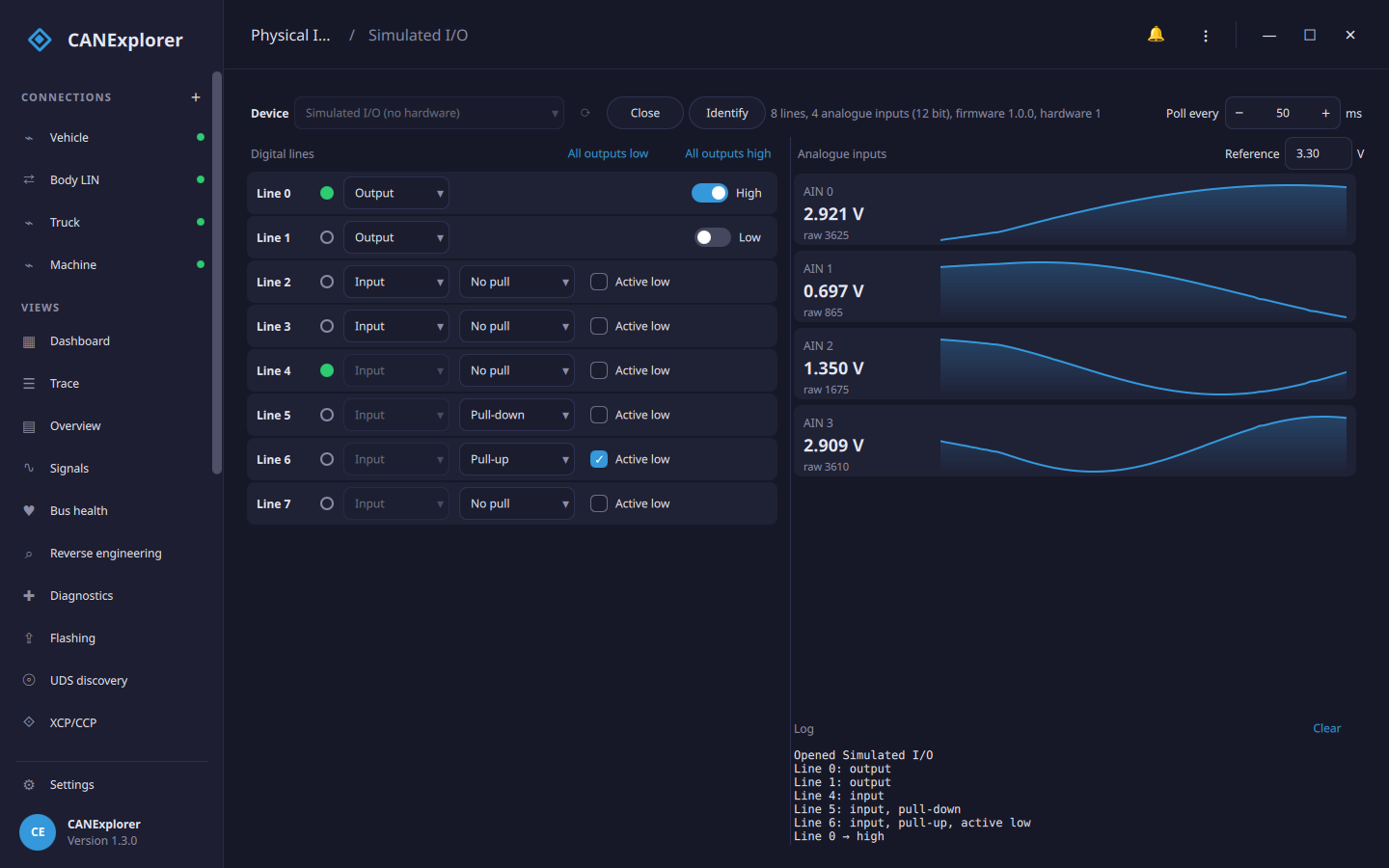
The Physical I/O tool in the sidebar switches the digital outputs of a USB I/O adapter and shows its digital inputs and analogue values, e.g. to switch an ECU's ignition or wake-up line with a relay while you watch its bus, or to check a sensor voltage. Test scripts can use the same device (see below).
Devices
| Device | What it offers |
|---|---|
| aio_usb adapters | The I/O interface of STM32 CAN/LIN/I/O adapter firmware (USB 1d50:606f): up to 32 digital lines and up to 16 analogue inputs, as many as the adapter reports |
| Simulated I/O | Eight lines (0–3 can be outputs) and four 12 bit analogue inputs; lines 4–7 are wired back to lines 0–3, so switching an output changes the input next to it. Works without hardware |
USB adapters need the optional pyusb and libusb packages. Run CANExplorer from source with the io extra; the
installers offer only the simulated device:
| System | Access to the adapter |
|---|---|
| Linux | A udev rule: SUBSYSTEMS=="usb", ATTRS{idVendor}=="1d50", ATTRS{idProduct}=="606f", MODE="0666", TAG+="uaccess" in /etc/udev/rules.d/70-aio-usb.rules, then sudo udevadm control --reload and plug the adapter in again. The CAN interface of the same adapter stays with the kernel's gs_usb driver |
| Windows | The I/O interface uses the WinUSB driver (installed automatically by firmware that announces it; otherwise with Zadig) |
| macOS | No setup |
A plain candleLight adapter has the same USB ID but no I/O interface and is not listed.
Using the tool
Choose a Device and click Open. The details next to it show the number of lines and analogue inputs, the ADC resolution and the firmware version. Identify makes the adapter show itself (e.g. blink its LED), to tell several apart. The device is read every 50 ms; Poll every changes that (20 to 1000 ms).
Digital lines. Each line shows its level (filled green: high) and is an Input or an Output; lines that can only be one of the two cannot be changed.
- Inputs have No pull, a Pull-up or a Pull-down, and can be Active low (the level shown is inverted).
- Outputs start low when a line is made an output; the switch drives it High or Low. All outputs low and All outputs high switch every output at once.
Analogue inputs show the value in volts and the raw ADC value, with the last few seconds as a small chart. The volts are computed with the Reference voltage, the voltage of the full ADC scale (3.3 V by default; set it to the adapter's reference, including any voltage divider in front of the inputs).
The log lists the changes and errors, e.g. Line 6 cannot be an output. When the adapter is unplugged, the tool reports that it stopped answering and closes it.
In scripts
can_explorer.core.physical_io opens the same devices from test scripts and simulations,
e.g. to switch the ignition before a test:
from can_explorer.core.physical_io import LineConfig, list_devices, open_device

print(list_devices())                        # [('aio:0042', 'aio_usb I/O adapter 0042'), ('simulated', …)]
io = open_device('aio:0042')
io.configure_line(0, LineConfig(output=True))
io.set_outputs(mask=0b1, values=0b1)         # Line 0 high: ignition on
status = io.read_status()
print(status.level(4), status.analog_volts(io.info, reference=3.3))
io.close()
A device can only be open in one place at a time: close it in the tool before a script opens it.